Have you noticed when charging your mobilephone, some chargers seem faster than others, while others can seem downright snail-like? The difference lies in different charging technologies like USB PD and PPS; understanding them can not only protect your battery better but also enhance your charging experience significantly.
Let’s quickly review the definition, characteristics, and differences between USB-C PD and PPS fast charging technologies to help make their use simpler for you.

What are the basics of USB PD fast charging?
USB Power Delivery, also known as “USB PD”, is an international fast charging protocol launched by the USB Developer Forum (USB-IF) on July 5, 2012. It supports multiple voltage levels from 5V to 48V while current can be adjusted between 0.5A and 5A for optimal charging power of 240W. Typically this type of charger uses dual-head USB Type-C interface data cable to connect devices to it.

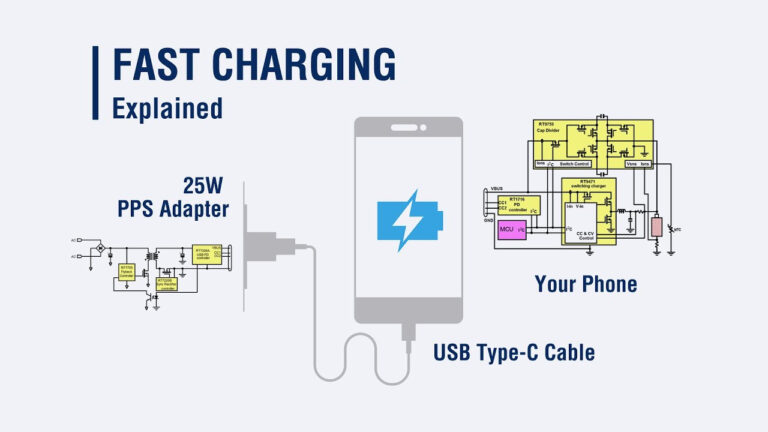
USB Power Delivery technology gives devices and chargers the ability to communicate. A charger can then dynamically adjust current according to your device’s needs – for instance if your phone supports 18W fast charging it will request 9V voltage which the charger will match automatically. In its original incarnation (20V), however this limit was raised up to 48V in USB PD 3.1 version.
Key Features of USB PD
Widely compatible: suitable for laptops, tablets, mobile phones and other devices.
Fast charging: Much faster than traditional charging methods.
Intelligent regulation: The device and charger can communicate in real time to dynamically adjust the voltage and current.
Multiple voltage levels: Supports voltage range from 5V to 48V.

What is USB PPS fast charging?
USB PPS stands for “Programmable Power Supply”, an additional feature added by USB-IF in 2017 for USB PD 3.0 and 3.1 standards, which allows real-time data exchange every 10 seconds as well as accurate voltage regulation between 3V-21V. It offers many advantages Compared with the traditional USB PD protocol.

PPS allows devices to greatly enhance charging efficiency, reduce energy loss, and speed up charging time. Furthermore, its dynamic current regulation feature helps prevent unnecessary heat production during charging for extended battery life.
Key features of PPS
Precise Regulation: Real-time adjustment of voltage and current every 10 seconds to ensure maximum charging efficiency.
Efficient Charging: Faster charging with less energy loss.
Reduce heat: Dynamically adjust current to avoid overheating and effectively extend battery life.
The Difference Between USB PD and PPS
USB Power Delivery’s (PD) primary drawback lies in its inflexibility; voltage changes within an instantaneous current range only; for instance if your phone requires 6V-6.5V but it only supports 9V-5V switching options through USB PD, an inappropriate voltage could be chosen, decreasing charging efficiency significantly.
PPS solves this issue, offering dynamic voltage/current regulation with finer increments so devices always stay within their optimal power range to preserve charging efficiencies and prevent reduced charging efficiency.
For example, USB PD is like a fixed gear acceleration of a car. You can only switch between “slow”, “medium”, “fast” and “very fast”, and cannot switch more flexibly. If you only need to slow down slightly, but have to switch to “slow”, it will increase the burden on the engine and cause overheating. PPS is like throttle adjustment, which allows you to accurately control the speed and reduce the loss of the engine.
Other significant differences lie in device compatibility: currently only certain chargers support PPS functionality while most devices already support USB PD – for instance Apple’s iPhone, iPad and Mac do not offer PPS protocol.
Here is a comparison table to help you understand the differences between USB PD and PPS better:
| USB PD (Power Delivery) | PPS (Programmable Power Supply) |
| Latest version: Support USB PD 3.1 | Latest version: USB PD 3.0 and above |
| Output range: 48V / 5A | Output range: 3.3V ~ 21V / 50mA |
| Maximum power: 240W | Maximum power: 100W |
| Supports multiple devices, such as smartphones, tablets, laptops, etc. | Supports limited devices, such as some smartphones, tablets, and laptops |
| Fast charging for iPhone, iPad and Mac | Apple devices are not supported yet |
| Allows communication between the device and the charger | Real-time adjustment every 10 seconds |
| Can switch between fixed voltage levels | Supports dynamic adjustment of voltage and current in small increments to improve charging efficiency |
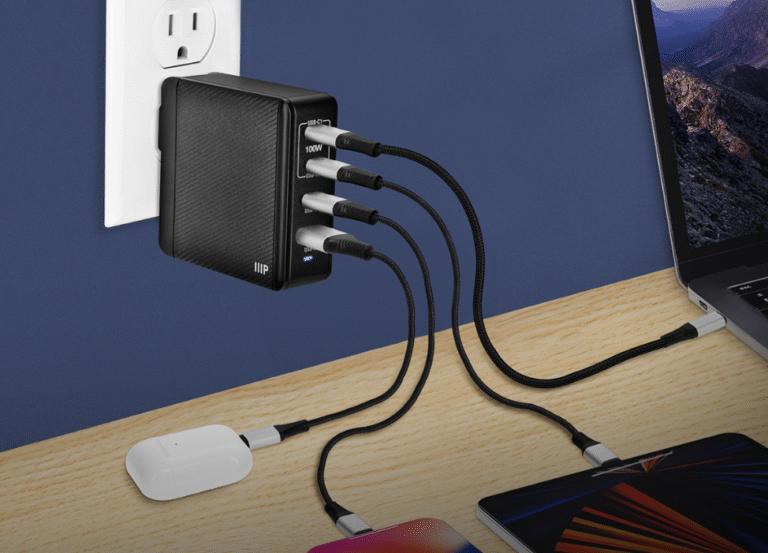
| Can charge multiple devices at the same time | Effectively reduce heat and extend battery life |
Why is USB PPS better than USB PD?
PPS’s dynamic real-time current regulation function not only ensures charging speed, but also greatly improves the safety of the device. It significantly reduces the risk of overheating during charging, allowing the device to charge quickly without affecting the charging efficiency due to excessive temperature. In this way, you don’t have to spend a lot of time waiting by the socket for charging.
Not only that, PPS can also effectively reduce heat accumulation during charging, thereby extending the battery life of smartphones. Even more considerately, even if your device does not support PPS charging, the USB PD 3.0 PPS charger can still provide an efficient fast charging experience for other devices.

Moreover, since the advent of PPS fast charging technology in 2017, many smartphone manufacturers have joined the PPS camp. Mainstream mobile phone brands at home and abroad have mobile phone models that support PPS fast charging, such as Samsung Galaxy, Google Pixel, Vivo, Huawei, Meizu and Xiaomi.
After the above introduction, I believe you have a clearer understanding of USB PD and PPS. Although PPS has more advantages in technology, device compatibility is still a major challenge for its widespread popularization.
FAQs
What is the difference between USB PD and PPS?
USB PD (Power Delivery) is a universal charging standard that operates with fixed voltage steps. In contrast, PPS (Programmable Power Supply) offers real-time voltage and current adjustments for more efficient charging. PPS dynamically optimizes power delivery, reducing heat and battery stress for faster and cooler charging.
Which one charges faster: USB PD or PPS?
PPS charges faster than USB PD, thanks to its ability to adjust power delivery dynamically, making it more efficient throughout the charging cycle. Devices that support PPS can benefit from higher speeds and better battery health due to reduced heat and optimal power regulation.
What are the benefits of using PPS for charging?
PPS provides faster, more efficient charging by offering real-time adjustments to voltage and current. This reduces heat buildup and minimizes stress on the device’s battery, promoting longer battery life and ensuring faster top-up during the final stages of charging.
Is PPS charging compatible with all devices?
While PPS delivers the best charging performance on compatible devices, it is backward compatible with standard USB PD chargers. If a device doesn’t support PPS, the charger will default to USB PD’s fixed voltage levels, still providing a fast charge, albeit at a lower rate.
Why is charging becoming more complicated with USB-C?
USB-C was meant to simplify charging, but its growing adoption across devices has introduced complexities. Different devices support varying charging speeds, protocols, and power requirements. For example, not all USB-C cables and chargers deliver the same performance, especially with power-hungry gadgets like laptops and high-performance smartphones.
What defines “fast charging” for Android devices?
“Fast charging” on Android refers to charging that delivers power significantly faster than traditional charging. The term lacks standardization, leading to confusion. While Qualcomm Quick Charge and USB Power Delivery (PD) are common standards, different devices and manufacturers implement them with varying performance, resulting in inconsistent charging speeds.
How does the iPhone 17 complicate USB-C charging?
The iPhone 17 introduces new USB-C charging limitations that further muddy the fast charging landscape. While USB-C was expected to simplify compatibility, Apple has implemented proprietary restrictions that prevent optimal charging speeds across all third-party chargers. This creates confusion among users about what chargers and cables are fully compatible.
What should I consider when choosing a USB-C charger?
When selecting a USB-C charger, focus on power output (watts), charging protocol compatibility (e.g., USB PD, Quick Charge), and device-specific needs. Ensure the charger supports your device’s maximum charging rate and offers safety certifications like CE or FCC. It’s important to choose a reliable supplier for consistent product performance.