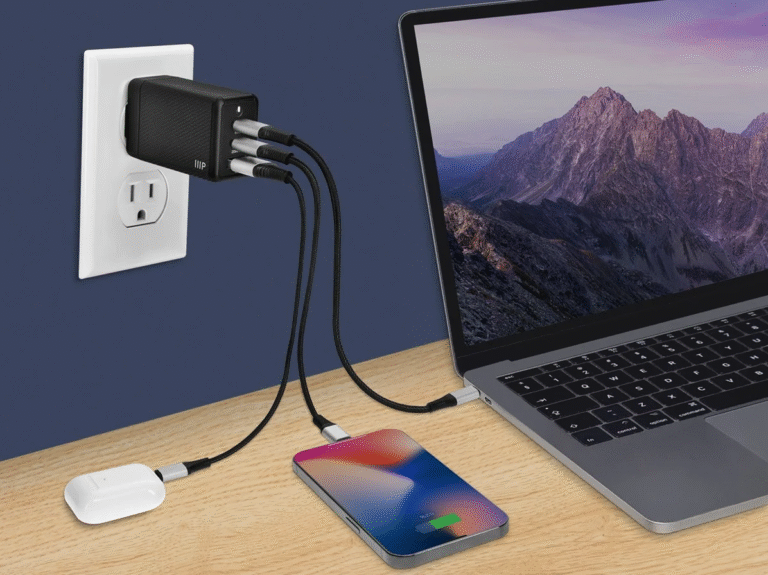
USB PD (Power Delivery) is the universal fast-charging protocol developed by USB-IF that raises the USB-C interface from a default 5V/2A to up to 100W (and 240W in PD 3.1 EPR), with bidirectional, negotiated power delivery. Unlike Qualcomm Quick Charge (QC), which is unidirectional and phone-focused, PD supports system-level power strategies across phones, tablets, laptops, and even power-sharing between devices—the foundation of the “one charger for everything” vision.
Last updated:
What is the PD fast charging protocol? USB PD is a power-transmission protocol from USB-IF, separate from the Type-C connector standard. It raises USB-C power from the 5V/2A default up to 100W (PD 3.0) or 240W (PD 3.1 EPR), with bidirectional, negotiated power delivery.
Key Takeaways
- USB PD is a power-transmission protocol from USB-IF; it is separate from the Type-C connector standard.
- PD raises USB-C power from 5V/2A default up to 100W (PD 3.0) or 240W (PD 3.1 EPR).
- PD communication is bidirectional: devices request voltage/current pairs via 24MHz FSK signaling on VBUS.
- Android 7.0+ phones must support PD per Google's requirement, unifying the fast-charging market.
- PD's system-level capability enables one charger for phones, tablets, and laptops—unlike unidirectional QC.
What Is the PD Fast Charging Protocol?
The PD charging protocol is a power-transmission protocol announced by USB-IF. It increases the default maximum power of the Type-C interface from 5V/2A to 100W. Google also announced that phones above Android 7.0 must support PD, aiming to unify the fast-charging market. USB PD expands cable bus power-supply capability, supports higher voltages and currents, and can freely change the direction of power delivery.
PD vs QC: A Comparison
| Technology | Voltage | Current | Maximum Power | Release Date |
|---|---|---|---|---|
| QC 1.0 | 5V | 2A | 10W | 2013 |
| QC 2.0 | 5V, 9V, 12V | 2A / 2A / 1.67A | 18W | 2015 |
| QC 3.0 | 3.6–20V, 200mV steps | 2.5A or 4.6A | 22W | 2016 |
| QC 4.0+ | USB-PD profiles + 20mV PPS | 3A (USB-PD) | 27W (USB-PD) | 2017 |
| USB PD 3.0 | 5–20V (PPS 3.3–21V) | up to 5A | 100W | 2017 |
The Relationship Between USB PD and Type-C
USB PD and Type-C are often discussed together, but they are different things: USB PD is a fast-charging protocol, while Type-C is an interface specification. The Type-C interface supports a maximum of 5V/3A by default; after implementing USB PD, output power can reach up to 100W. That is why many Type-C devices now also support USB PD.
Advantages of the PD Protocol
PD focuses on power transmission between two or more devices, or even a smart grid based on the USB interface. Power transmission can be bidirectional and networked, with system-level power-supply strategy. QC, by contrast, only focuses on phone fast charging: transmission is unidirectional, without power-networking capability. If PD becomes universal, one charger can power all phones at home, plus your computer and tablet—and the phone can even act as a mobile power source.
USB PD Fast Charging Communication Principle
USB PD communication modulates protocol-layer messages into a 24MHz FSK signal coupled to VBUS, or extracts the FSK signal from VBUS, enabling communication between phone and charger. The process: the phone's USB OTG PHY monitors VBUS and detects a 1K OTG ID pull-down indicating the cable supports PD; the phone performs charger detection and decodes the CapabilitiesSource message to list supported voltage/current pairs; the phone sends a Request via FSK coupling; the charger sends an Accept and adjusts its DC output; and during charging, the phone can dynamically send new Requests to change voltage and current.
How to verify USB PD fast charging protocol before making a decision
The dependable approach is to match the exact device, accessory and operating condition to published evidence. Start with USB-IF, then document the combination you actually test. This separates compatibility from marketing claims and makes the result repeatable.
| Decision point | Evidence to check | Common mistake |
|---|---|---|
| Device requirement | Record supported protocol, voltage/current range and peak power | Selecting by wattage alone |
| Port behavior | Check output for the actual multiport combination | Using the advertised total as one-port output |
| Cable capability | Verify current, power and e-marker requirements where applicable | Ignoring the cable as a limiting component |
| Validation condition | Test at repeatable load, battery level and temperature | Comparing results under different conditions |
A repeatable validation checklist
Use the same conditions for every comparison so a change in temperature, cable, port sharing or device load does not distort the result. Stop using any accessory that is damaged, discolored or unusually hot.
- Record the exact model numbers, regional variants and software versions.
- Photograph or transcribe the relevant input and output ratings.
- Test a known-good baseline before changing one component at a time.
- Repeat the test at a similar starting state and ambient temperature.
- Keep the specification, test notes and purchasing decision together for later verification.
FAQs
What is the difference between USB PD and Type-C?
Type-C is the physical connector/interface specification (default 5V/3A); USB PD is the power-delivery protocol that raises the power ceiling (up to 100W in PD 3.0, 240W in PD 3.1). Many Type-C devices also support PD.
What is the difference between PD and QC?
PD supports bidirectional, system-level power delivery across phones, tablets, laptops, and networking; QC is a unidirectional, phone-focused fast-charging protocol. PD is the more universal standard.
How fast can USB PD charge?
USB PD 3.0 supports up to 100W (20V/5A) and PD 3.1 EPR up to 240W—enough to fast-charge phones, tablets, and laptops from one charger.
Does USB PD work with any cable?
PD requires a USB-C cable capable of the negotiated current (typically 3A or 5A rated). Under-rated or low-quality cables limit power and can be unsafe.
Can USB PD charge in both directions?
Yes. PD supports bidirectional power flow, so a phone can charge a laptop or another accessory in supported configurations.
This article is part of USB-C PD and PPS, the guide that covers this topic in decision order.
Related Articles
- USB PD vs PPS: Which One Charges Faster?
- How Does a PPS Charger Work?
- What Are the Common Certifications for Power Adapters?
Official Resources
References
- Protocol history and comparison follow the original article; verify current specs with USB-IF.