Your wireless charger gets warm because wireless power transfer is inherently lossy: electrical energy is converted into a magnetic field and then back into electrical current, and each conversion step wastes energy as heat. Some warmth is completely normal, especially at 15W or higher charging speeds. Excessive heat—painful-to-touch surfaces, smoke, discoloration, or repeated overheating warnings—is not, and usually points to misalignment, foreign objects, thick cases, or a poor-quality charger.
(Last modified date: September 2, 2026)
Is it normal for a wireless charger to get hot? Yes. Energy conversion losses during electromagnetic induction generate heat in both the pad and the phone, especially at 15W or higher speeds. The charger and phone should feel warm, not painful to touch.
Key Takeaways
- Wireless charging works by electromagnetic induction, and energy conversion losses create heat in both pad and phone.
- Misalignment, metal foreign objects, thick/metal cases, and heavy phone use all increase heat.
- Moderate warmth is normal; pain-level heat, smoke, or repeated thermal warnings require immediate attention.
- Remove thick cases, center the phone, keep the pad clear, and use certified Qi chargers with over-temperature protection.
Energy Conversion Inefficiency: The Core Culprit
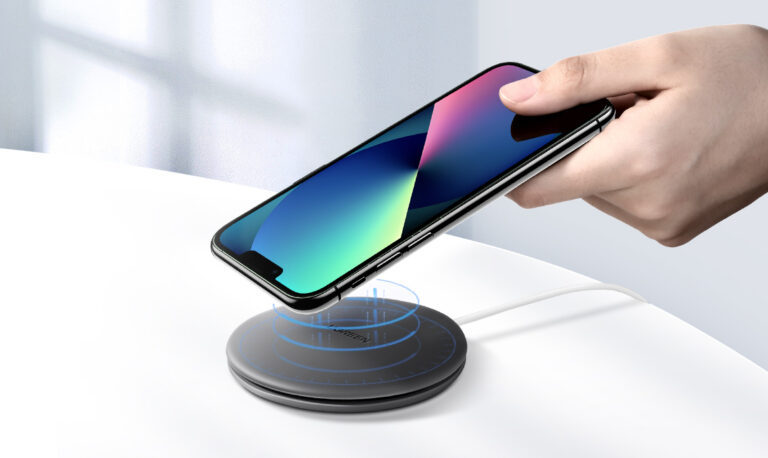
Wireless chargers work through electromagnetic induction: the pad’s transmitter coil creates an alternating magnetic field, and the phone’s receiver coil converts it back into electrical current. This double conversion—electricity to magnetic field to electricity—is not 100% efficient. The lost energy dissipates as heat in the coils of both the charger and the phone. Higher charging speeds (15W or 30W) move more power, meaning more energy loss and potentially more heat.
Electromagnetic Effects: Eddy Currents & Hysteresis
The rapidly alternating magnetic field induces small circulating currents (eddy currents) in any nearby conductive metal that is not part of the charging system—metal parts in the charger casing, the phone chassis, or metallic objects such as keys or coins. These currents generate heat. Ferrite materials in the coils also constantly realign their magnetic domains (magnetic hysteresis), and that physical realignment dissipates energy as heat.
Coil Misalignment: Working Harder, Not Smarter
Maximum energy transfer occurs when the transmitter and receiver coils are perfectly aligned. When misaligned, magnetic coupling weakens, so the charger works harder and may operate at a higher frequency to deliver the required energy—significantly increasing energy loss and heat in both devices. Center your phone on the pad according to alignment guides.
Foreign Objects: Unwanted Guests
Metal objects (paperclips, coins, keys, foil wrappers) or thick metal credit cards placed between the phone and charger interact intensely with the magnetic field, causing strong eddy currents and rapid, significant heating—a fire and burn hazard. Most modern chargers have foreign object detection (FOD), but it is not foolproof; keep the surface clear.
Power Regulation & Electronics
Both the pad and the phone contain circuitry that converts AC to DC, regulates voltage and current, manages battery charging profiles, and communicates between devices. These chips, resistors, and regulators naturally generate some heat, especially when managing higher power levels.
Device-Specific Factors: Cases & Usage
- Phone cases: thick or metal cases interfere with the magnetic field, forcing the charger to work harder and trapping heat.
- Phone activity: gaming, video streaming, or GPS navigation while charging adds processor heat on top of charging heat.
- Battery chemistry: charging a battery—especially near full capacity or when already warm—inherently generates heat.
Is the Heat Normal? When to Worry
Some warmth is expected and normal for both the charger and the phone, especially with faster chargers. Be concerned if: the charger or phone becomes too hot to touch comfortably; you notice smell, smoke, or discoloration; the phone shows overheating warnings or stops charging frequently; or battery life degrades significantly after consistent use with a hot charger.
Minimizing Heat & Staying Safe
- Remove thick or metal phone cases before charging.
- Ensure proper alignment—center your phone on the pad.
- Keep the charging surface clear of metal objects.
- Place the charger on a hard, flat, well-ventilated surface; avoid beds and sofas that trap heat.
- Avoid heavy use (gaming, streaming) while wirelessly charging.
- If heat is a consistent concern, use a 5W or 7.5W charger instead of a 15W/30W unit.
- Buy certified chargers (such as Qi-certified) with over-temperature control and foreign object detection.
In Conclusion
Warmth from a wireless charger is largely a byproduct of the physics that enables cord-free convenience. Energy loss during electromagnetic conversion is the primary driver, amplified by misalignment, foreign objects, case interference, and device activity. Moderate heat is expected, but excessive heat requires attention and action.
FAQs
Is it normal for a wireless charger to get hot?
Yes. Energy conversion losses generate heat in both the pad and the phone, especially at 15W or higher speeds. The charger and phone should feel warm, not painful to touch.
Why does my phone get hot while wirelessly charging?
Combined heat sources include conversion losses in the coils, eddy currents in metal parts, misalignment, thick cases that trap heat, and heavy phone use during charging.
Can a wireless charger overheat and damage my phone?
Certified chargers with over-temperature control and foreign object detection are designed to prevent this. Damage risk rises with uncertified chargers, metal objects, or blocked ventilation.
Does a metal phone case interfere with wireless charging?
Yes. Metal cases interrupt the magnetic field, force the charger to work harder, and generate extra heat. Remove them before wireless charging.
Why does my wireless charger heat up more with a thicker case?
Thicker cases increase coil distance and reduce coupling efficiency, so more energy is lost as heat; they also insulate the phone, trapping heat.
How can I cool down my wireless charger?
Use a ventilated surface, remove thick or metal cases, ensure alignment, avoid heavy use during charging, and switch to a lower-power certified charger if heat persists.
This article is part of Wireless & Built-in Charging, the guide that covers this topic in decision order.
Related Articles
- Why Does Wireless Charger Overheating Occur?
- History and Development of Wireless Charging
- When Was Wireless Charging Invented?
Official Resources
References
- Digi Electronics – “Thermal Management in Wireless Charging” and IEEE thermal-design references are cited in the original article.