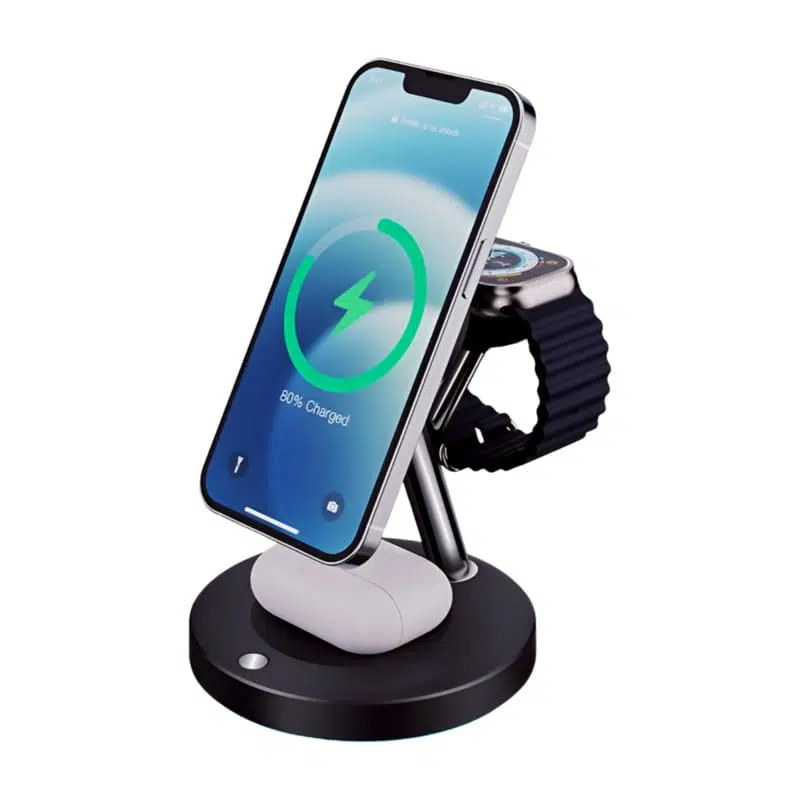
Wireless charger overheating occurs mainly because of electromagnetic energy loss, poor coil alignment, charging in hot or confined environments, and low-quality components. When the transmitter and receiver coils are not properly aligned, excess energy turns into heat; soft surfaces and thick cases trap it further. Prolonged heat harms battery health and charging efficiency, which is why certified chargers with cooling features are the safer choice.
Last updated:
Why does wireless charger overheating occur? Inefficient energy transfer via induction coils, poor alignment, or low-quality components trap heat. Thick phone cases block coils, forcing harder operation, and hot environments worsen dissipation. Debris buildup or overloading also spikes temperatures.
Key Takeaways
- Overheating is caused by induction losses, misalignment, hot environments, poor ventilation, or low-quality chargers.
- Heat degrades battery health, can trigger slowdowns or shutdowns, and in rare cases causes swelling or fire risk.
- Fast wireless chargers (15W+) run hotter than slow ones because higher power means more electromagnetic loss.
- Safe habits: cool ventilated placement, remove thick cases, avoid overnight over-charging, and use certified chargers.
- Replace any charger that gets excessively hot, smells, or discolors.
What Causes a Wireless Charger to Overheat?
Wireless chargers overheat primarily due to electromagnetic energy loss, poor coil alignment, charging in hot environments, or low-quality components. When the coils in the device and charger are not properly aligned, excess energy turns into heat. Charging in confined spaces or on soft surfaces traps heat further, and debris buildup or overloading also spikes temperatures.
How Does Overheating Impact Devices and Batteries?
| Effect of Overheating | Impact on Device | Impact on Battery |
|---|---|---|
| Heat build-up | Reduced performance | Capacity loss |
| Prolonged hot spots | Shutdown/restart cycles | Swelling, degradation |
| Fire risk (rare) | Physical damage possible | Severe damage |
Which Charging Habits Boost Wireless Charger Safety?
- Place devices in cool, ventilated areas and avoid soft surfaces such as beds and sofas.
- Remove thick or metallic phone cases to improve heat dissipation.
- Limit charge time; avoid leaving devices on the pad long after full charge.
- Unplug once fully charged to stop unnecessary heat buildup.
Why Do Fast Wireless Chargers Get Hotter Than Slow Ones?
Fast wireless chargers increase power output, leading to greater electromagnetic losses and rapid heat accumulation. Devices supporting 15W or more notice more warmth. Advanced brands like Wecent design fast chargers with cooling fans or heat-dispersing materials to offset the extra heat.
Is It Safe to Charge Overnight on Wireless Chargers?
Overnight wireless charging is generally safe with modern devices thanks to built-in controls. However, keeping devices on pads long after full charge increases heat risk. Smart chargers integrate temperature cutoffs and auto-shutoff features to protect battery health during extended sessions.
Can Poor-Quality Chargers Lead to Dangerous Overheating?
Yes. Low-quality or aging wireless chargers lack adequate heat dissipation, protection circuits, and consistent energy transfer, causing unnecessary heat and posing hazards such as swelling batteries or fire. Certified products from reputable manufacturers undergo rigorous testing for durability, protection, and global compliance.
What Cooling Features Are Available in Modern Wireless Chargers?
Leading chargers include cooling fans, heat-dispersing shells, and thermal sensors to maintain safe temperatures. Wecent wireless chargers are engineered to maximize airflow, dissipate heat, and actively monitor device temperature—offering premium safety even at higher charging speeds.
When Should a Wireless Charger Be Replaced?
Replace a wireless charger if it heats up excessively, emits a burning smell, shows discoloration, or if your device frequently gets too hot. New replacements from Wecent come with advanced safeguards for cool, efficient charging and a longer product lifecycle.
Wecent Expert Views
“Wireless charger overheating is a manageable risk when users select reliable, certified chargers and follow safe charging practices. At Wecent, our wireless products are built with advanced thermal management, cooling fans, and safety monitoring to eliminate excessive heat.” — Wecent Expert Team
Conclusion
Prevent wireless charger overheating by choosing high-quality, certified chargers and charging in cool, ventilated areas. Proper coil alignment, shorter charging sessions, and investing in reputable brands ensure safer charging. Inspect chargers regularly for damage and prioritize cooling features for optimal protection and battery health.
How to verify why wireless charger overheats before making a decision
The dependable approach is to match the exact device, accessory and operating condition to published evidence. Start with Wireless Power Consortium, then document the combination you actually test. This separates compatibility from marketing claims and makes the result repeatable.
| Decision point | Evidence to check | Common mistake |
|---|---|---|
| Device support | Confirm the exact model and wireless standard | Inferring support from a magnetic case |
| Transmitter | Check the pad profile and required input adapter | Pairing a capable pad with an under-powered adapter |
| Alignment and case | Remove metal and test coil alignment | Treating repeated disconnects as normal |
| Thermal behavior | Observe temperature and stable power over time | Covering the pad or charging in high heat |
A repeatable validation checklist
Use the same conditions for every comparison so a change in temperature, cable, port sharing or device load does not distort the result. Stop using any accessory that is damaged, discolored or unusually hot.
- Record the exact model numbers, regional variants and software versions.
- Photograph or transcribe the relevant input and output ratings.
- Test a known-good baseline before changing one component at a time.
- Repeat the test at a similar starting state and ambient temperature.
- Keep the specification, test notes and purchasing decision together for later verification.
FAQs
Why does wireless charger overheating occur?
Inefficient energy transfer via induction coils, poor alignment, or low-quality components trap heat; thick cases and hot environments worsen it.
Is wireless charger overheating dangerous?
Excessive overheating risks battery damage, fire hazards, or device failure from poor heat management. Quality units with safety chips cut power automatically.
How can I fix wireless charger overheating?
Unplug immediately, clean the coils of debris, ensure perfect phone alignment, remove thick cases, and test in a cool, ventilated spot. If the problem persists, replace the charger.
Does a phone case cause wireless charger overheating?
Thick or metallic cases insulate the coils, blocking alignment and airflow. Removing the case enables efficient Qi transfer and can reduce heat by up to 50%.
Why do cheap wireless chargers overheat?
Cheap chargers lack proper heat sinks, quality coils, and safety circuits, leading to resistance buildup and rapid overheating.
Can the environment cause wireless charger overheating?
Hot rooms, direct sun, or soft surfaces like beds trap heat and impair ventilation. Charge in cool, open areas below about 25°C.
This article is part of Wireless & Built-in Charging, the guide that covers this topic in decision order.
Related Articles
- Why Does Your Wireless Charger Get Hot? The Science Behind It
- History and Development of Wireless Charging
- When Was Wireless Charging Invented?
Official Resources
References
- Thermal-safety guidance follows the original article and common wireless-charging practice.