
Slow charging is rarely a single failure. It is usually one of five conditions, and the order in which they are checked decides whether the problem is found in two minutes or replaced with a new charger that behaves the same way.
This is the sequence a support desk can run with a customer, and the same sequence a brand can use when a returned product is reported as not fast charging.
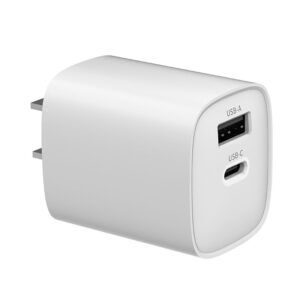
Why is my iPhone charging so slowly?
Usually the cable, the charger profile or heat.
The five common causes are a cable that cannot carry the negotiated current, a charger below or outside the stated profile, thermal throttling, background load, and battery condition.
Apple’s fast-charging guidance states the adapter class required for each iPhone generation, and anything outside it produces a slower charge without an error message (Apple Support: Fast charge your iPhone). The diagnostic value of that document is that it separates two questions: is the charger supposed to fast charge this phone, and is it actually doing so.
The order below moves from the most common cause to the least common, because each step eliminates a variable cheaply. Replacing the charger first is the most expensive way to start.
Step 1: is the cable the limiting part?
A cable that cannot carry the negotiated current caps the result regardless of the charger. The quick test is to swap in a known-good cable that matches the phone’s generation requirements and see whether the behaviour changes. If it does, the cable was the variable.
Cable failure is physical as often as electrical. The connector insert moulding loosens, the shell cracks, and the phone reports intermittent charging before it reports slow charging. On older handsets the port itself also collects lint, which produces the same symptom and can be cleared with a soft, dry brush.
Step 2: is the charger negotiating the right profile?
USB Power Delivery is a negotiation, not a fixed output: the charger advertises profiles and the device requests one (USB-IF: USB Power Delivery). A charger that does not implement the standard properly, or that implements it with a lower maximum than the phone expects, delivers a valid but slow charge.
Two checks are useful here. First, compare the charger against the requirement stated for that iPhone generation. Second, test the same charger on a different device to see whether the behaviour follows the charger or the phone. If a charger charges one phone quickly and another slowly, the negotiation behaviour is the likely difference rather than the hardware.
Step 3: is heat throttling the charge?
Phones reduce charging power as temperature rises, which is why a phone charging on a sofa cushion, under a pillow or in direct sunlight can take far longer than the same phone on a desk. This is a protective behaviour, not a defect, and it usually shortens the fast-charging portion of the session rather than stopping the charge.
Testing this is straightforward: charge in a cool, ventilated place with the phone out of a thick case and screen off, and compare. If the charge is fast under those conditions, the difference was thermal. A charger with higher conversion efficiency also contributes less heat to the system, which is one practical argument for GaN platforms in a bedside or pocket use case.
Step 4: is background load competing with charging?
Charging time is a balance between energy in and energy out. Navigation, hotspot use, gaming and screen-on video can consume a substantial share of what a 20W charger delivers, so the battery fills slowly even though the charging circuit is working correctly.
The test is to compare a charging session with the screen off and background activity limited against normal use. Where the difference is large, the product documentation should not be changed; the user’s expectation should. For retail bundles, a charger tier with more headroom is a partial answer, but the honest explanation is the load balance.
Step 5: is the battery or charge management involved?
Modern phones manage charge level deliberately: they can slow the final portion of a charge, delay it based on learned routines, or stop at a set level. Behaviour that looks like slow charging near the end of a session is often the device managing the battery rather than a fault in the accessory.
Battery condition is the other variable. A battery with significant wear and high internal resistance accepts power more slowly and generates more heat while doing it, which compounds the thermal effect described above. Where a phone is several years old, that is a plausible primary cause rather than an accessory fault.
When the phone is fine and the accessory is at fault
The clearest evidence that the accessory is responsible comes from comparison: the same charger behaves correctly with a second device, the same cable charges a second device quickly, and the phone fast charges with a known-good adapter and cable. If all three statements are true, the accessory is not the variable.
For brands handling returns, that comparison is also the basis of a fair claim assessment. A supplier with batch traceability can check the returned unit against the production record for that batch, which is how WECENT’s quality control gates and batch records are used in practice.
What a retail bundle should specify to avoid the problem
Most slow-charging complaints can be designed out of a bundle with three specification lines: the adapter must meet the stated requirement for the target phone generations, the cable must be rated for the negotiated current, and the charger must hold the negotiated profile without oscillation under load.
WECENT quotes from a written specification through its OEM/ODM programme, starting at 200 pcs per model, with GaN platforms covering 20W–240W and interchangeable EU, UK, US and AUS plugs. Adapter efficiency obligations sit with the product file in the EU (Regulation (EU) 2019/1782) and the United States (10 CFR Part 430), and radio frequency compliance for the charger’s electronics follows the FCC Part 15 framework (47 CFR Part 15). Transit and packaging expectations can be written against a published protocol such as ISTA’s (ISTA) so the bundle survives shipping as well as it performs on the desk.
Inspection records for the batch are produced at quality control gates, and charger and cable bundles are supplied as a single specification rather than as separate sourcing decisions.
FAQ
Why does my iPhone charge slowly with a new charger?
The most likely cause is that the charger or cable does not meet the requirement for that iPhone generation, or that the cable cannot carry the negotiated current. Apple publishes the adapter class required for fast charging by generation; testing a known-good cable and adapter separately identifies which part is limiting.
Can a cable really slow down charging that much?
Yes. Charging is limited by the weakest link in the path, and a cable with a low current rating caps the power that reaches the phone regardless of the adapter behind it. Cable damage at the connector also produces intermittent charging before it stops working entirely.
Why does my iPhone charge fast at first and then slow down?
Charging tapers as the battery fills and as temperature rises, and phones may also pause or delay charging near the end of a session as part of charge management. If the behaviour happens early in the session on a correctly rated charger, thermal conditions and background load are the first things to check.
Does a higher-wattage charger fix slow charging?
It can, if the existing charger is below the requirement for the phone or if a second device is drawing power at the same time. It will not change behaviour caused by a limiting cable, thermal throttling or heavy background use, which is why the diagnostic order matters before replacing hardware.
What should a brand include in a fast-charging bundle?
Three lines cover most of the risk: an adapter that meets the stated requirement for the target generations, a cable rated for the negotiated current, and a charger that holds its negotiated profile without oscillation. WECENT supplies charger and cable bundles from the same quality system, with MOQ from 200 pcs per model.
Trying to reduce slow-charging returns?
Share the target devices and markets, and WECENT will confirm the adapter tier, cable rating and batch documentation for a bundle designed against this failure mode.
Request a bundle specification
This article is part of iPhone Chargers, the guide that covers this topic in decision order.