iPads charge over USB-C PD, but the wattage each model uses differs — and most buyers over- or under-size without a reference. This guide covers the wattage needs of Pro, Air and Mini, the cable requirements, and how to build setups that charge an iPad alongside everything else.
How iPad charging requirements differ by model
iPad Pro models accept the most power, followed by Air and Mini. The exact maximum is set by Apple's charging firmware, but the practical guidance is simple: 20W covers most iPads, 30–45W fast-charges them, and a 65W+ charger adds headroom for charging while the iPad is heavily used.
The differences are modest in wattage but real in behavior: a Mini charges fine at 20W, an Air is comfortable at 30W, and a large Pro under heavy use benefits from 45–65W because it can be charging while running demanding apps. All modern iPads negotiate over USB PD, so any certified USB-C PD charger works — the wattage tier just changes fill speed and use-while-charging behavior.
Wattage needed for Pro, Air and Mini
| iPad model | Comfortable charger | Fast-charge tier |
|---|---|---|
| iPad Mini | 20W | 20–30W |
| iPad Air | 20–30W | 30W |
| iPad Pro (11") | 30W | 30–45W |
| iPad Pro (12.9"/13") | 30–45W | 45–65W |
All modern iPads use USB-C and charge with any USB-C PD charger, consistent with Apple's fast-charge guidance; the higher tiers simply fill faster and sustain use-while-charging better.
The wattage ladder matters most for the Pro under load and least for the Mini at night. A practical family rule: keep a 20W charger per iPad for overnight charging, and add one 45–65W charger for the Pro user's desk. The cost difference between tiers is small compared with the daily frustration of a charger that cannot keep up with a working tablet.
USB-C PD and cable requirements
USB-C iPads negotiate power over USB PD. A quality USB-C-to-C cable rated for the charger's output is required — most iPad cables are fine at 60W, and the USB-C specification governs compatibility.
Charging iPad while using it heavily
A 20W charger may barely keep up with a Pro under heavy load; 45–65W maintains the battery while you work. If your users run demanding apps while charging, size the charger for the workload, not just the fill time.
An iPad Pro running video editing or rendering can draw 20–30W on its own, so a 20W charger barely maintains the battery while a 45–65W charger actually fills it. This is the scenario that produces "my iPad won't charge while I use it" complaints, and the fix is sizing the charger for the workload, not the device class. Fleet buyers should ask users about heavy-use workflows before standardizing on a wattage.
Using one charger for iPad plus other devices
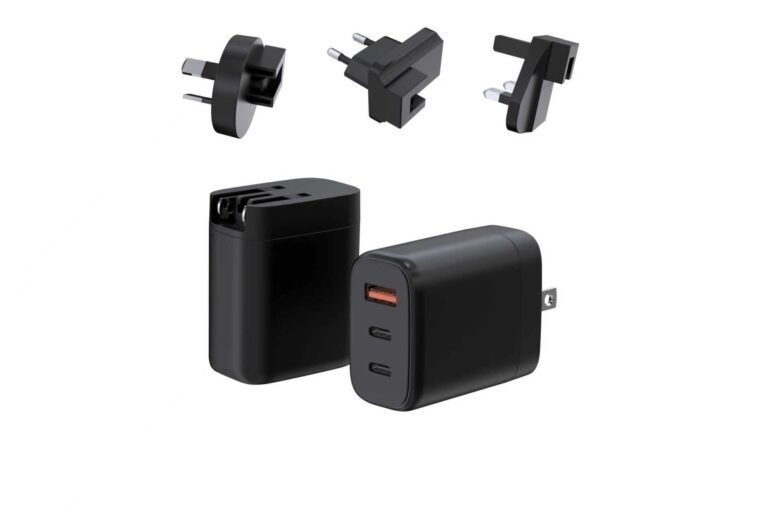
A 65W multi-port charger covers iPad plus iPhone and earbuds; a 100W model adds a laptop. The WET-65-CA 65W GaN adapter is the classic iPad-plus-phone setup, while the WET-100W-C 100W model handles iPad plus MacBook.
The single-charger setup for iPad households is a 65W multi-port brick: one port delivers 45W to the iPad while another fast-charges a phone, and a third tops up earbuds. For iPad plus MacBook, move to 100W. The combined-output table is the spec that makes this work, so verify it before buying and before recommending it to customers.
Buying guidance for families and fleets
For families, one 45–65W charger per iPad covers charging and tops up phones. For corporate fleets, standardize on one certified charger per device class and keep spare cables; certified, tested chargers reduce support tickets and damage claims.
For families, the guidance is one charger per device plus one shared high-wattage station; for fleets, standardization beats optimization. A fleet buying 500 chargers benefits more from one certified 45W SKU with a documented test report than from three slightly cheaper models with different failure profiles. The fleet decision should include support cost: a charger with published test data and batch traceability reduces troubleshooting time, and its warranty terms define the replacement path. Write the wattage requirement into the procurement spec ("USB-C PD, 30W minimum, 45W preferred, certified for target markets") and let suppliers bid against the spec rather than against each other's marketing. The result is a predictable fleet that charges any iPad in any office without a compatibility spreadsheet.
Signs your current charger is undersized for an iPad
The signs: the iPad charges very slowly, the battery percentage drops while in use, or the charger gets hot at high load — a signal that power supply design is being pushed past its comfort zone. If your iPad is a Pro and the charger is 20W or less, sizing up to 30–45W fixes all three.
The symptoms have a reliable order of appearance: battery drains during heavy use, charging from 20% takes more than two hours, and the charger runs hot at the end of a session. All three resolve by stepping up one wattage tier. Document the symptoms in buying guides so users self-diagnose instead of returning a working charger for a second opinion.
Charging iPad with USB-C monitors and docks
USB-C monitors and docks can charge the iPad while passing video, but the delivered wattage depends on the dock. Check the dock's power-delivery spec: many deliver 30–60W, which is fine for Air and Mini but marginal for a Pro under load.
A USB-C monitor or dock can power the iPad and carry video over one cable, but the delivered wattage is set by the monitor's power-delivery output — commonly 30–60W. Check the monitor's spec before assuming it charges the iPad at full speed; some monitors power small iPads well but starve a Pro under load. When that happens, a dedicated 45W+ charger on a second cable is the reliable fix.
Travel setups that cover iPad and phone
A single 65W multi-port charger replaces the iPad brick and phone charger in one pouch. Pair it with a short and long USB-C cable; for international travel, choose a model with 100–240V input and the right plugs — the pattern behind multi-port travel charging.
A travel setup that covers iPad and phone needs one brick, two cables and a pouch: a 65W dual-port charger, a 100W-rated USB-C-to-C cable for the iPad, and a short cable for the phone. Add the regional plug set and the same brick covers international travel. This is the packing list that turns three devices into one pouch.
Battery care for long iPad life
iPad batteries last longest at moderate temperatures and partial charge states. Avoid charging in direct sunlight, remove thick cases during heavy use, and let the iPad manage its own charging curve — the charging curve is controlled by the device, not the charger.
Long-term battery health favors moderate temperatures and partial charge states: avoid charging in direct sunlight, remove thick cases during heavy use, and don't leave the iPad at 100% in a hot car for days. The iPad manages its own charging curve, so the charger's role is simply to be certified and correctly sized — battery care is about environment, not about babying the adapter.
Choosing certified cables for iPad charging
Use cables rated for at least the charger's output, ideally USB-IF certified. A damaged or undersized cable is the most common cause of "iPad stopped fast charging" — replace it before suspecting the charger.
FAQ
What charger does an iPad Pro need?
A 30–45W USB-C PD charger for fast charging; 45–65W if you use the Pro heavily while charging. Any USB-C PD charger works, just at different speeds.
Can I charge an iPad with a laptop charger?
Yes — laptop chargers are USB-C PD and work with any USB-C iPad. The iPad negotiates the power it needs.
What is the best charger for iPad Air and Mini?
20–30W covers both comfortably; 30W fast-charges them and leaves headroom.
Why is my iPad charging slowly?
Likely an undersized charger, a damaged cable, heavy use during charging, or an older iPad with a lower charging limit. Test with a quality cable and a 30W+ charger first.
Outfitting your family or fleet with iPad-compatible chargers? Send your device mix and volume to our team through the contact page — we will match wattage tiers to your iPads and other devices.
This article is part of iPhone Chargers, the guide that covers this topic in decision order.