A watch that stops at 80 percent is usually following the same charge-management logic as a phone, but the diagnosis differs because a wearable has less thermal margin and its charger relies on magnetic alignment rather than a cable.
That combination produces three plausible causes, and they can be separated in a few minutes.
Why is my Apple Watch not charging to 100%?
Charge management or heat.
The watch may be holding a charge at around 80 percent as part of its charge management, or it may be pausing because the charger or the watch reached a temperature threshold.
Apple documents optimised charging behaviour for its devices, including the practice of holding a charge below 100 percent until it is needed, and the company publishes battery guidance that applies to wearables as well as phones (Apple: Batteries). If the cap occurs consistently at the same level and the watch completes the charge before the owner’s usual start time, it is a feature rather than a fault.
If the watch stops at an inconsistent level, or the case becomes noticeably warm, the more likely cause is thermal: the watch pauses when its own temperature or the charger’s rises beyond a threshold. That behaviour is protective.
Optimised charging on a wearable
The logic predicts when the wearer will next need the device and delays the final portion of the charge to reduce the time the battery spends at a high state of charge. It depends on a consistent routine: a wearer whose schedule changes frequently may see the behaviour appear and disappear.
The practical consequence for support teams is that the same watch can behave differently from week to week without any fault, which is why product documentation should describe the behaviour rather than promise a charge level.
Dock and charger factors: alignment and third-party pucks
Magnetic alignment is the mechanical part of wireless charging, and a watch is small enough that a change in band thickness or a strap that sits under the puck can shift the coils apart. The result is a slower charge, more heat at the coil, and behaviour that looks like a charging limit.
Third-party pads vary in coil placement and in how the watch sits on the surface. Where a station has a dedicated watch position, that position is part of the product specification, and the magnetic behaviour of the Qi standard is what governs compatibility (Wireless Power Consortium: Qi). A pad that charges a phone correctly may still be a poor fit for a watch if the watch position is generic.
Heat during charging and what a warm watch means
Warmth is expected: the energy that does not reach the battery becomes heat in the coils and the charging circuit. A watch charging on a bedside table with the band closed has less surface area to dissipate that heat than the same watch lying open, which is why the same device can behave differently in two positions.
The practical tests are to open the band, move the watch to a cooler surface, and confirm that the magnetic puck is centred. If the charge then completes, the earlier behaviour was thermal or alignment-related rather than a battery fault.
Battery health checks and how to read them
Wearables report battery health as a percentage of original capacity, and the value drifts downwards with cycles and with time spent at high temperature. A watch with reduced health accepts power more slowly and generates more heat while doing so, which compounds the thermal behaviour described above.
For a retailer handling a warranty question, the health figure and the charging behaviour are two separate pieces of evidence: one describes the cell’s condition, the other the conditions the watch was charged in. Both belong in the record before a claim is accepted or refused.
When the cap indicates a hardware fault
The pattern that suggests a fault is inconsistency under identical conditions: the same pad, the same temperature, a different result on consecutive days. A puck that no longer holds the watch in position, or a cable whose connector has become loose at the pad, also produce intermittent behaviour that no charge-management feature explains.
Testing with a second known-good charger is the fastest way to separate the two, and the same test applied to a second watch isolates the pad. Where both tests are ambiguous, the device is the variable worth investigating.
Buyer note: reading the watch position in a multi-device station
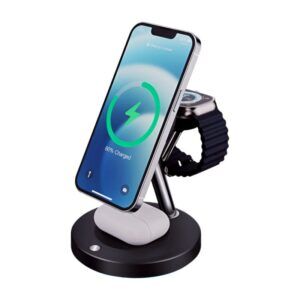
For a brand specifying a 3-in-1 station, the watch position deserves its own specification line: coil size and placement, magnet arrangement, and the surface the watch rests on. A generic position copied from a phone pad is the most common cause of a station that charges phones well and watches slowly.
WECENT builds multi-device wireless platforms within its wireless charger range, including dock and stand formats, and the alignment behaviour of the watch position is part of the design rather than an accessory detail. Production records from the quality control gates cover the functional tests applied to each batch. Where a station includes an adapter, its output negotiation follows the USB Power Delivery standard (USB-IF: USB Power Delivery), and packaging can be validated against a published transit protocol (ISTA). EMC requirements for the wireless function follow market frameworks such as the FCC Part 15 rules (47 CFR Part 15).
FAQ
Why is my Apple Watch only charging to 80%?
The most common reason is the device’s own charge management, which holds a charge below 100 percent until it predicts the owner will need it. If the level varies or the case is unusually warm, thermal protection or a charger alignment problem is the more likely cause.
How do I get an Apple Watch to charge to 100%?
Confirm the charge-management setting, charge in a cooler place with the band open, and centre the watch on the magnetic puck; then re-test. If the watch completes a charge under those conditions, the earlier behaviour was environmental rather than a battery or charger fault.
Does a third-party charger affect Apple Watch charging?
It can, because the watch position on a third-party pad depends on its own coil placement and magnet arrangement. A station designed with a dedicated watch position will charge more consistently than a generic pad where the watch rests wherever it fits.
Is a warm charger normal for a watch?
Warmth is expected because the energy not transferred to the battery becomes heat in the coils and electronics. The behaviour to watch for is charging that stops repeatedly at room temperature with a correctly rated adapter, which points to thermal design or alignment rather than to normal operation.
What should a brand specify for a watch charging position?
Coil size and placement, magnet arrangement, the resting surface and the airflow around the watch. Treating the watch position as a copied phone pad is the most common design fault in multi-device stations, and it shows up as slow charging rather than as a failure.
Designing a watch charging position?
Share the device mix, station format and target markets, and WECENT will confirm the coil and magnet specification, test plan and MOQ from a written brief.
{“@context”:”https://schema.org”,”@type”:”FAQPage”,”mainEntity”:[{“@type”:”Question”,”name”:”Why is my Apple Watch only charging to 80%?”,”acceptedAnswer”:{“@type”:”Answer”,”text”:”The most common reason is the device’s own charge management, which holds a charge below 100 percent until it predicts the owner will need it. If the level varies or the case is unusually warm, thermal protection or a charger alignment problem is the more likely cause.”}},{“@type”:”Question”,”name”:”How do I get an Apple Watch to charge to 100%?”,”acceptedAnswer”:{“@type”:”Answer”,”text”:”Confirm the charge-management setting, charge in a cooler place with the band open, and centre the watch on the magnetic puck; then re-test. If the watch completes a charge under those conditions, the earlier behaviour was environmental rather than a battery or charger fault.”}},{“@type”:”Question”,”name”:”Does a third-party charger affect Apple Watch charging?”,”acceptedAnswer”:{“@type”:”Answer”,”text”:”It can, because the watch position on a third-party pad depends on its own coil placement and magnet arrangement. A station designed with a dedicated watch position will charge more consistently than a generic pad where the watch rests wherever it fits.”}},{“@type”:”Question”,”name”:”Is a warm charger normal for a watch?”,”acceptedAnswer”:{“@type”:”Answer”,”text”:”Warmth is expected because the energy not transferred to the battery becomes heat in the coils and electronics. The behaviour to watch for is charging that stops repeatedly at room temperature with a correctly rated adapter, which points to thermal design or alignment rather than to normal operation.”}},{“@type”:”Question”,”name”:”What should a brand specify for a watch charging position?”,”acceptedAnswer”:{“@type”:”Answer”,”text”:”Coil size and placement, magnet arrangement, the resting surface and the airflow around the watch. Treating the watch position as a copied phone pad is the most common design fault in multi-device stations, and it shows up as slow charging rather than as a failure.”}}]}