The single-brick Apple setup is real: one GaN charger can cover a MacBook, iPhone and iPad — if the wattage covers the laptop, the ports can split output, and the cables fit in your bag. Here is how to build that setup without compromises that surprise you at the airport.
Mapping Apple device power requirements
The laptop is the binding constraint: a MacBook Air needs 30–45W comfortably, a MacBook Pro wants 60–96W or more. The iPhone needs 20W+ for fast charging, and the iPad negotiates 20–45W. The sum of what you actually charge simultaneously — not the sum of all devices — decides the brick.
The real-world numbers are lower than the marketing maximums: a MacBook Air typically pulls 30–45W, a 14" Pro 60–96W, an iPad 20–45W, and an iPhone 20W. Because the laptop is the largest load, the single brick must have one port capable of the laptop's requirement while still splitting power to other devices. That is why 65W works for many setups but 100W is the comfortable universal choice.
Choosing a wattage that covers the laptop
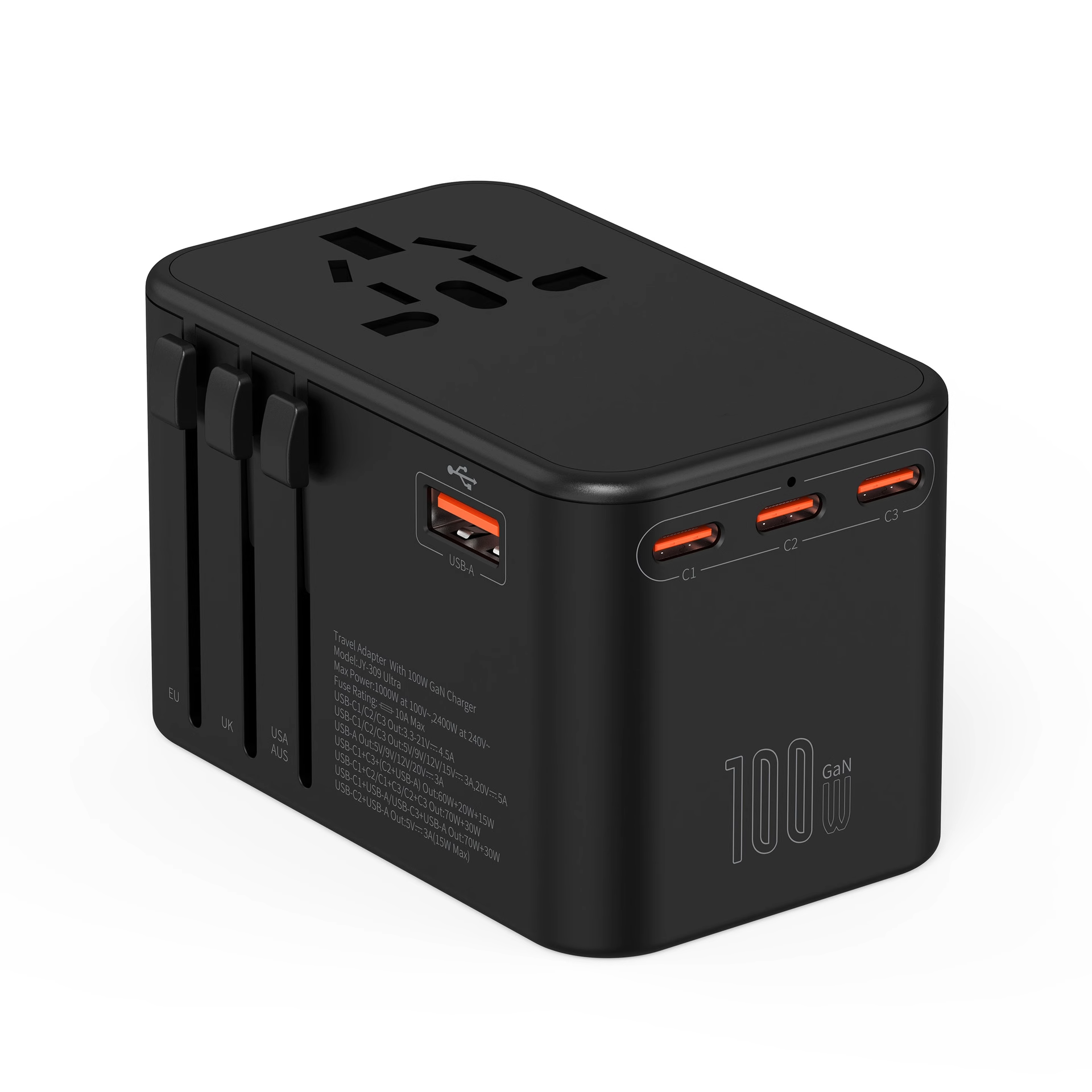
A 100W charger covers every current MacBook, iPhone and iPad combination with room to spare; 65W works for MacBook Air and most 14" Pros under light load. The GaN 100W travel charger is the safe single-brick choice for the full Apple lineup.
Laptop wattage is workload-dependent, not label-dependent: a MacBook Pro under video export draws more than at idle, and a charger sized to the average may sag during peaks. The safe rule is to match the charger's laptop-port output to the laptop's maximum sustained draw, then add one tier for simultaneous device charging. That is why 100W is the recommended single-brick tier for a 60–70W laptop plus devices.
Port layouts that charge laptop plus devices
Look for at least two ports with one capable of the laptop's wattage. A common layout delivers 65W + 30W, which charges the MacBook and iPhone at full speed simultaneously. Three ports add an iPad or earbuds; verify the combined output table before buying.
Port allocation decides whether the setup actually works: a 100W charger with 65W + 30W allocation charges a MacBook Pro and an iPhone at full speed simultaneously, while a design that caps the second port at 10W leaves the phone slow. Read the combined-output table and verify with a real two-device test before trusting the layout. Dynamic allocation that redistributes power when a device unplugs is a strong sign of a modern design.
Cables you need in the bag
One USB-C-to-C cable rated for 100W covers MacBook, iPad and modern iPhone; add a USB-C-to-Lightning cable if you still carry an older iPhone. Two cables total is the maximum a single-brick setup needs.
Cable redundancy is a travel decision: one 100W cable covers everything, a second shorter cable adds backup and bedside convenience, and a USB-C-to-Lightning cable only earns its space if you actually own a Lightning device. Packing three cables when two suffice adds weight without value. Label the 100W cable so it is never swapped for a 60W one in a hurry.
Weight and size trade-offs
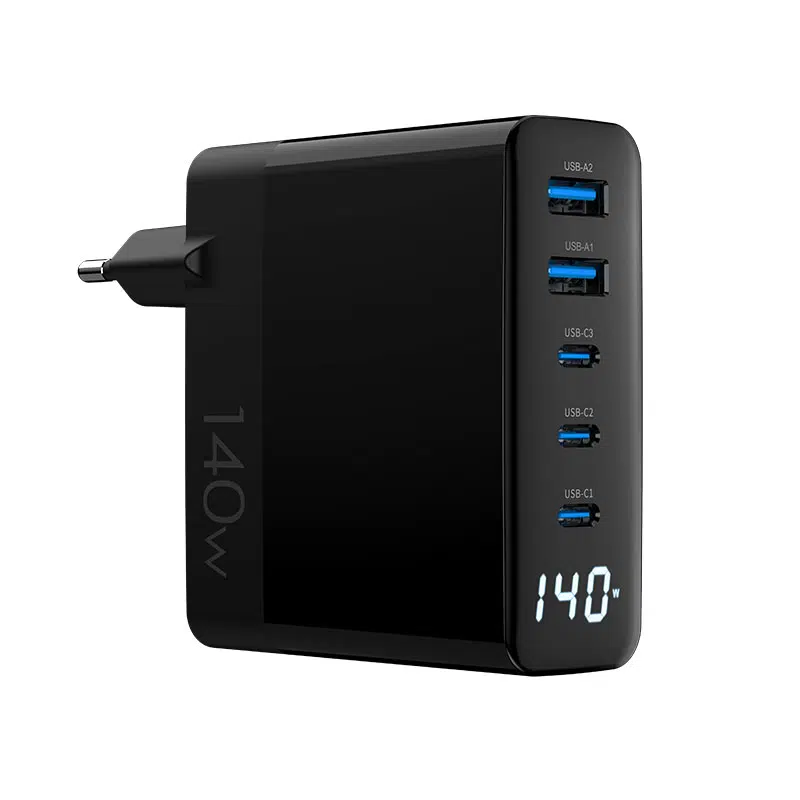
A 100W GaN brick weighs roughly 150–250g depending on design — about the same as the MacBook's original 96W adapter, but with two or three ports and travel plugs. The WEG-140W-2A3C 140W model trades a little weight for more ports and headroom.
A 100W GaN brick at 150–250g replaces the MacBook's original 96W adapter (which may weigh similar) but adds ports and travel plugs — net win for a travel bag. The trade-off appears when you compare 100W single-port against 140W multi-port: the extra wattage and ports cost weight and heat, so buy the smallest charger that covers your actual simultaneous load.
Real-world packing list for Apple users
- One 100W multi-port GaN charger
- One 100W-rated USB-C-to-C cable
- One USB-C-to-Lightning cable (if needed)
- Optional: a short cable for bedside charging
- Optional: a 10,000–20,000mAh power bank with PD
The packing list is deliberately short because every extra item competes for bag space and weight. The 100W brick, one long 100W cable, one short backup cable and a pouch cover a business trip for a MacBook, iPhone and iPad; adding a 20,000mAh PD power bank covers flights and long days. Travelers who add a second brick "just in case" carry weight they rarely use, and travelers who skip the backup cable risk a hotel-room failure with no spare. The list is also the product story for a travel-charger SKU: show the complete kit in the listing, and the buyer sees the system, not just a brick. For brands, publishing the packing list as a downloadable guide positions the charger as the center of a travel system rather than one more accessory.
How to verify a charger supports all three devices
Check three things: USB PD support, per-port output (one port must meet the laptop's wattage), and combined output when two or three ports are used — with power supply design data backing the claims. Test with all three devices charging before a trip — the spec table and reality should match.
The verification test takes ten minutes: charge the laptop at full load while the iPhone charges, confirm the laptop port holds its rated wattage and the phone shows fast charging, then add the iPad and check the redistribution. Compare the measured behavior with the combined-output table. A charger that matches its table across all three devices is the one that belongs in the travel bag.
Charging speeds you give up with one brick
With one brick, you usually charge the laptop at full speed and the phone or iPad at a slightly lower speed simultaneously. That trade-off is invisible in practice — the phone still fast-charges, just not at the same instant as the laptop's peak.
Power bank backup for Apple travel
For long flights or full days away, add a USB-C PD power bank (20,000mAh class) that can top up the MacBook at 60–100W. Keep it under 100Wh to stay within airline rules, and charge it from the same single brick overnight.
Choose the power bank by the laptop's draw: a 20,000mAh bank delivering 60–100W tops up a MacBook during a flight, while a 10,000mAh bank only serves phones and tablets. Keep the bank under 100Wh for airline carry-on, and recharge it from the same 100W brick overnight. The brick and bank form one system — size them together, not separately.
Airport and flight-friendly charging choices
Choose a charger with foldable or interchangeable plugs so it packs flat, and keep the input range 100–240V for global travel. Multi-region plug kits add versatility; the travel charger lineup covers EU/UK/US/AUS variants.
Upgrading later: when one charger stops being enough
When you add a second laptop, a heavier Pro model, or need simultaneous charging at full speed, one brick stops being enough — GaN technology will have made the next tier smaller by then — that is the moment to move to a 140W multi-port model. A single-brick setup with headroom, like 100W today, postpones that upgrade for years.
The upgrade trigger is a second laptop or a heavier Pro under simultaneous load, not a new phone. If you find yourself charging the MacBook first, then the phone, because the brick cannot do both at speed, that is the signal to move up a tier. Buying one tier of headroom now (100W for a 65W workload) postpones that trigger for years.
FAQ
Can one charger charge a MacBook and iPhone at the same time?
Yes, with a multi-port charger where one port delivers the laptop's wattage and the combined output covers both. A 65–100W dual-port is the practical range.
What wattage do I need for MacBook, iPhone and iPad?
65W covers a MacBook Air plus phone and iPad under light load; 100W covers every current combination with headroom.
Is a 140W charger overkill for Apple devices?
For one MacBook, yes; for two laptops, a heavy Pro under load plus devices, it is the right headroom. Buy by the simultaneous load, not the device count.
What cables do I need for the Apple ecosystem?
One 100W-rated USB-C-to-C cable covers MacBook, iPad and modern iPhone; add a USB-C-to-Lightning cable only if you have an older iPhone.
Designing a single-brick travel charger for Apple users? Send your target devices and volume to our team through the contact page — we can match wattage and port layouts to the full Apple lineup.
This article is part of iPhone Chargers, the guide that covers this topic in decision order.