The drawer of old laptop chargers is a museum of connectors: round barrel plugs in half a dozen diameters, proprietary rectangular bricks, and a tangle of cables that only fit the machine they shipped with. USB-C changed that. One connector now carries power to ultrabooks, mainstream laptops and even high-performance machines, which means a single charger type can serve an entire fleet. This guide explains how laptop charging evolved, the wattage tiers that define the category, how the laptop and charger negotiate power, how to match a charger to a fleet, and where OEMs start when they build a laptop charger line.
From Barrel Connectors to USB-C
Laptop charging was proprietary for decades. Each manufacturer chose a barrel connector, a voltage and a polarity, and the charger only worked with its own machines. Travelers carried multiple bricks; IT departments stocked per-model spares; and a dead charger meant a trip to the manufacturer's store.
USB-C changed the game in two steps. First, the connector became universal — the same reversible plug appears on phones, tablets, laptops and accessories. Second, USB Power Delivery made the power negotiation standard, so a USB-C charger can deliver different voltages to different devices and let each device request what it needs. The combination killed the "one machine, one charger" logic: a laptop that charges over USB-C can accept power from any charger whose profile covers its request.
The transition is not complete everywhere — some high-performance and workstation laptops still ship with proprietary or high-wattage connectors — but the direction is clear, and every refresh cycle moves more of the fleet onto USB-C. For buyers, the practical consequence is that the charger decision is no longer about finding the exact model number; it is about choosing the right tier and profile for the devices in the line.
The same transition reshaped the retail shelf. Where stores once stocked a wall of per-model chargers, the USB-C era allows a short row of wattage tiers with one connector type, and the packaging can focus on the tier and the port count instead of a compatibility list that fits one machine. For a brand or a distributor, that is a simplification of the assortment — fewer SKUs, clearer packaging, and a compatibility story that scales as new laptops adopt USB-C.
The Wattage Tiers That Define the Category
Laptop chargers are organized by wattage tiers, and each tier serves a device class:
| Tier | Devices it covers | Typical role |
|---|---|---|
| 45W | Thin-and-light ultrabooks, some convertibles | Entry tier |
| 65W | Most ultrabooks and productivity laptops | Workhorse tier |
| 100W | Full-size laptops and multi-device setups | Laptop-plus tier |
| 140W | Premium high-performance laptops | High-power tier |
| 240W | Workstations and gaming machines | Maximum tier |
The tier map is the backbone of the category. A 65W charger covers the majority of business laptops; 100W covers full-size machines and adds headroom for a phone and tablet; 140W and 240W exist for machines that request more. The rule for matching is simple: match or exceed the original adapter's rating. A charger rated below the laptop's request will charge slowly or not at all under load, and a charger rated above is safe because the laptop negotiates what it needs.
Expert view — WECENT project engineering team: The wattage ladder is where most product-line decisions are made. We see buyers over-spec to a 140W charger for a fleet that mostly needs 65W, which raises cost and size without improving the experience. Start from the fleet audit, pick the tier that covers the largest group, and handle the exceptions explicitly.
How Negotiation Works Between Laptop and Charger
When a USB-C laptop is plugged in, the charger and the laptop exchange information before power flows. The charger advertises the voltage and current profiles it can deliver — the PDO table — and the laptop selects the profile that matches its request. The negotiation is why one charger can power a phone at 20W, an ultrabook at 65W and a workstation at 140W: each device asks for what it needs, and the charger delivers it.
The negotiation also explains common troubleshooting questions. A laptop that charges slowly may have selected a lower profile because the cable is under-rated, because the charger's profile list does not cover the laptop's request, or because another device on a multi-port charger is drawing power. The visible result — "it's plugged in but charging slowly" — is almost always a negotiation outcome, not a hardware failure.
For buyers, the practical takeaway is to read the profile list before buying: the 20V row is the row that matters for laptops, and a charger that lists 20V at the right current is a laptop charger. A charger that only lists phone-level profiles is a phone charger wearing a bigger number.
Matching a Charger to a Laptop Fleet
For a single laptop, matching is trivial: read the original adapter's wattage and match it. For a fleet, matching becomes a planning exercise:
- Audit the fleet. List every laptop model, its requested wattage and its connector type.
- Find the clusters. Group models by wattage tier; most fleets have one dominant cluster.
- Choose the tier. Pick the charger tier that covers the largest cluster at or above its request.
- Handle the exceptions. High-power or proprietary-connector machines keep their own chargers, or move to the next tier explicitly.
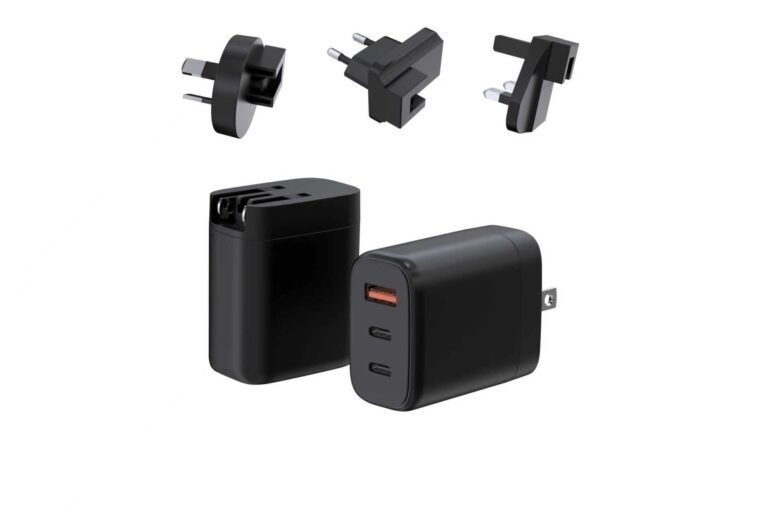
- Decide the plugs. One regional plug per market for a regional fleet, or interchangeable plugs for a global fleet.
The output is a small set of charger SKUs — often one wattage tier and one plug strategy — instead of a drawer of per-model chargers. That is the same logic behind corporate charger standardization, and it applies to retail lines too: a brand stocking laptop chargers wants the tiers that match the machines its buyers actually carry.
Where OEMs Start a Laptop Charger Line
For an OEM, the starting point is not a wattage; it is a platform. A charger platform is a proven power stage with defined ports, plugs and certifications, and the OEM line is built by customizing the brand layer — logo, color, finish, packaging — on top of it.
The platform choice follows the market: a regional line typically uses a fixed-plug platform with one plug per market and a simple certification story; a global or travel line uses an interchangeable-plug platform. The wattage tier follows the device class the line serves, and the port layout follows the use case — 1C for minimal, 1C1A for phone-plus-laptop, 2C or more for multi-device.
The OEM conversation also includes the commercial layers: MOQ, samples, certification documents and packaging. A line decision is not a single product pick but a project plan — the tier, the platform, the plugs and the brand layer are frozen together, and the samples validate the combination before volume. Buyers who walk in with a device list and a market list get a faster, more accurate proposal than buyers who ask for "a laptop charger."
The GaN charger range page lists the platforms and their power ranges, and the WECENT FAQ page answers the protocol questions that come up during selection. For a line decision, the WECENT project engineering team can review the target devices, markets and MOQ and propose the platform and configuration.
For buyers, the USB-C era reduces the choice to tier, profile and plug — decide those three, and the per-model compatibility list largely takes care of itself.
Frequently Asked Questions
Can I use a phone charger to charge a laptop?
Only if the charger's output covers the laptop's request. Most laptops need 45W or more over USB-C, while a phone charger may deliver 20W or 30W — enough to slow-charge or maintain a laptop, but not to run it under load.
Is a higher-wattage charger safe for my laptop?
Yes. The laptop negotiates the profile it needs and draws only what it requests. A 100W charger is safe for a 65W laptop; it simply will not force more power in.
How do I know what wattage my laptop needs?
Read the label on the original adapter. The wattage printed there is the number to match or exceed. If the adapter is lost, check the manufacturer's spec page for the model.
Why does my laptop charge slowly with a 65W charger?
The usual causes are a cable rated below the negotiated current, another device sharing the charger's power, or a charger whose profile list does not include the laptop's 20V request at sufficient current.
Can one charger work for a whole laptop fleet?
Yes, when the fleet is audited and the charger tier covers the dominant cluster at or above its request. Exceptions — high-power or proprietary machines — are managed explicitly.
Where do OEM laptop charger lines start?
They start with a platform: a proven power stage with defined ports, plugs and certifications, then the brand layer is customized on top. The platform choice follows the market and the device class.
This article is part of Laptop Chargers, the guide that covers this topic in decision order.