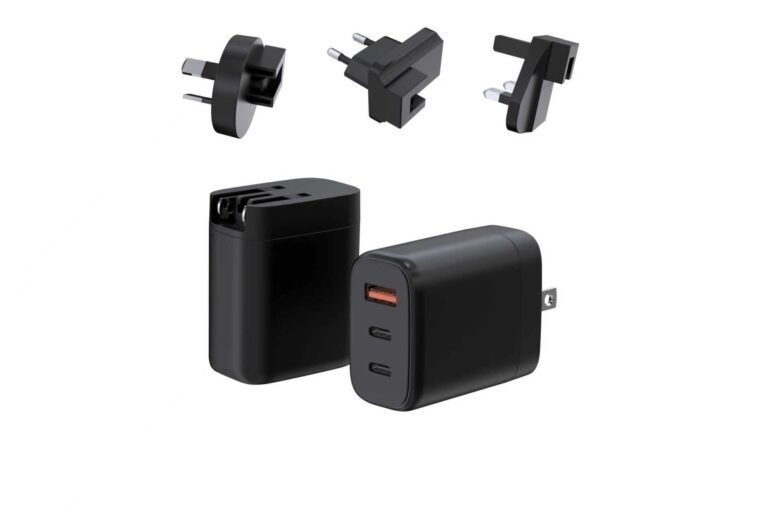
For a brand or channel team adding a charger SKU to an ultrabook line, 65W is usually the first tier to evaluate: it covers the majority of thin-and-light laptops at full speed, it can charge a phone from the same brick, and it travels well enough to become a single in-box or retail SKU. The 65W charger is the workhorse tier of the category — this guide covers which laptops actually fit the tier, how one brick serves a phone and a laptop together, which port layouts make sense for a product line, what to verify for travel, thermals and cables, and the shortlist of specs to lock before you order.
The tier sits inside the wider GaN Charger Category, where the 65W and higher models are listed side by side so you can compare them against your line's wattage ladder.
Which Laptops Fit the 65W Tier
The fit question is decided by the original adapter's wattage. Laptop makers specify what their machines request, and the safe rule for any line is to match or exceed that rating:
- Ultrabooks and thin-and-light laptops — most 13–14-inch productivity machines request 45–65W over USB-C; a 65W charger covers them at full speed.
- MacBook Air models — Apple's lightweight notebooks generally work in the 30–65W range depending on the generation; check the exact recommendation per model.
- Convertibles and 2-in-1s — many ship with 45W or 65W adapters, making 65W a natural replacement or upgrade.
- Phones, tablets and earbuds — these negotiate lower profiles and draw only what they need, so the same brick serves them without risk.
What 65W does not cover is a full-size laptop that requests 100W or more, such as some 15–16-inch professional notebooks and gaming machines. Those belong in the 100W or 140W conversation, which is why a well-built line carries a 65W entry SKU and higher tiers above it rather than forcing everything into one wattage.
For compatibility claims in your own catalog, keep them specific. Name the device classes the charger covers, and confirm model-level behavior with real devices before publishing a compatibility list — a charger that negotiates a 20V profile for laptops and a PPS or PD profile for phones covers both, but the exact model list belongs in testing, not in marketing.
Phone and Laptop on One Brick
The practical value of the 65W tier is that one brick replaces two: an ultrabook adapter and a phone charger. When the laptop charges alone it receives the full negotiated power. When a phone joins a dual-port model, the charger reallocates power between the ports — the exact split is published in the product's spec table, so it is worth reading before you stock rather than assuming both ports run at full power at the same time.
The same logic applies to tablets and earbuds: they sit lower in the negotiation, so they can share the brick with a laptop without slowing it down. That makes 65W a natural fit for:
- A single travel brick in a work bag.
- An in-box accessory for an ultrabook launch.
- A retail SKU that replaces a shelf of 20W and 45W adapters.
- A corporate refresh where each employee carries one laptop and one phone.
If the technical background matters for your buyers — how PD and PPS differ and which phones benefit from PPS — the WECENT published FAQ answers it directly. The purchasing decision itself is simpler: at 65W, one well-chosen charger replaces two or three old ones.
Port Layouts Worth Considering
The port layout decides how power is shared, so it is the second decision after wattage. The common layouts at the 65W tier:
| Layout | Ports | Typical use |
|---|---|---|
| 1C | One USB-C | Single-device minimalism; smallest and lowest cost |
| 1C1A | One USB-C + one USB-A | Laptop on USB-C, older phone or accessory on USB-A |
| 2C | Two USB-C | Two modern USB-C devices |
A 1C1A layout is often the most practical at 65W because USB-A still appears on older cables, earbuds cases and small accessories, while USB-C carries the laptop. A 2C layout suits an ecosystem that is already fully USB-C. A 1C brick is fine for a minimal single-user SKU but offers no flexibility for a second device.
Size matters more at 65W than buyers expect. Compact GaN designs fit a full 65W in a very small body — the WET-67-CC GaN adapter from WECENT measures about 46.5×46×28 mm and weighs around 92 g, small enough to live permanently in a bag. When comparing models, look at dimensions and weight, not just wattage: the point of the tier is that the brick disappears into the carry.
Expert view — WECENT project engineering team: The port layout question we get most often is "which one sells best," and the honest answer is that 1C1A outsells the others at 65W because the USB-A port still carries older cables and earbuds cases. Decide the layout from the device mix your line targets, then verify the split map with real devices — the published table and the bench behavior should tell the same story.
Travel, Thermals and Cable Ratings
Three factors decide how the charger behaves in real life: plugs, heat and cables.
Plugs. Interchangeable EU, UK, US and AUS plugs turn one charger into a global adapter set. The WET series charger pages are built around this idea, with interchangeable plugs on their 65W and 100W adapters, so a travel line can run a single SKU across the main markets. For a regional line, the fixed-plug WEP Series keeps per-unit cost and per-region certification simpler. The choice between them is the first platform decision for any 65W line.
Thermals. Sustained output generates heat, and heat is why cheap chargers throttle or fail. A well-designed GaN charger keeps a 65W laptop load stable because the power stage runs efficiently and the housing dissipates heat. Thermals cannot be verified from a spec sheet alone; the practical checks are the factory's aging/load test plus a real-device test on your side, running the laptop and phone together for an extended session.
Cables. The cable is half of the system. For 65W over USB-C, use a cable rated for the current: a 3A cable covers most 60–65W profiles, while higher-current configurations need a 5A e-marked cable. A weak cable silently caps the delivered power, which is why two buyers testing the "same" charger can see different results.
Compare the 65W fixed-plug and travel-plug platforms before you commit — the WEP and WET series pages show both approaches, and the right choice depends on whether your line sells regionally or across markets.
For complete travel kits, the travel charger category shows how a compact 65W charger combines with cables and accessories for global use.
Expert view — WECENT project engineering team: On thermal testing, our rule of thumb is simple: run the heaviest combination you sell for at least an hour and feel the housing at the end. If the output drops or the housing keeps climbing, the design is not carrying the heat — and no spec sheet will tell you that.
A Shortlist of Specs Before You Order
Before locking a 65W SKU — for a retail line, an in-box bundle or a corporate program — confirm these items:
- Wattage and profiles. 65W over USB-C with the PD profiles your laptops need (typically a 20V step), plus PPS if your phone line relies on it.
- Port layout. 1C, 1C1A or 2C based on the devices your buyers actually carry.
- Split map. What both ports deliver together, straight from the product spec table.
- Plugs. Fixed regional plugs or interchangeable EU/UK/US/AUS, decided by the markets you serve.
- Size and weight. A compact design that fits the bag and the retail story.
- Certifications. Model-specific CE, FCC, RoHS or other marks for each target market.
- Warranty and support. WECENT describes a standard 2-year warranty on most products; confirm the terms for your contract.
- Samples. Validate compatibility and thermals with real devices before volume, and ask for the PDO table and split map with the sample.
Request a 65W sample with your plug and packaging configuration — the WECENT engineering team will confirm the model, the PDO/split documentation and the MOQ for your line.
Frequently Asked Questions
Can a 65W charger charge a MacBook Air?
Most MacBook Air generations work within the 30–65W range, so a 65W USB-C charger is generally a good fit — verify the exact recommendation for each model and use a cable rated for the full output.
Can a 65W charger damage a phone?
No. The phone negotiates with the charger and draws only what it supports. A 65W charger is safe for a phone; it simply will not charge faster than the phone's own limit.
Is 65W enough for a laptop that needs 100W?
No. A laptop that requests 100W should be matched with a 100W or higher charger, otherwise it may charge slowly or not at all under load. Keep higher tiers in the line for those models.
Do I need a special cable for 65W?
Use a USB-C cable rated for the current. A 3A cable covers most 60–65W profiles; a 5A e-marked cable is needed for higher-current configurations. The wrong cable silently limits speed.
Can I use a 65W charger with global plugs on a trip?
Yes. The WET series uses interchangeable EU, UK, US and AUS plugs, so one 65W charger covers the main travel markets; verify the input voltage range and plug fit for each destination.
What does PPS mean on a 65W charger?
PPS (Programmable Power Supply) is a PD feature that lets the charger adjust voltage continuously, which many phones use for their fastest charging. Whether it matters depends on the phones in your target line.
This article is part of Laptop Chargers, the guide that covers this topic in decision order.