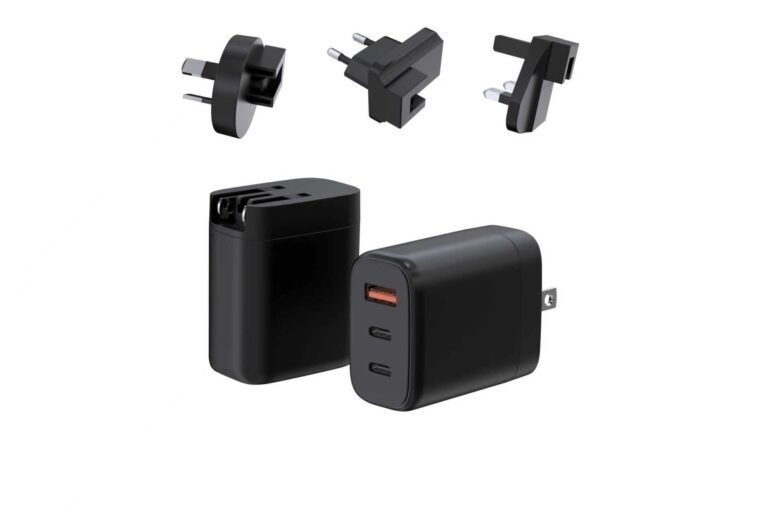
The multi-port laptop charger is the answer to the bag problem: one brick that charges the laptop, the phone and the tablet, instead of three chargers and a tangle of cables. The tier works when the port layout matches the device stack and the split map covers the combinations the user actually runs. This guide covers the multi-device bag problem, the port layouts and what they promise, how intelligent power distribution works, the desktop-versus-travel difference, and how to choose between a 2-port and a 5-port brick.
The Multi-Device Bag Problem
The bag carries a laptop, a phone, earbuds and often a tablet — and each device used to bring its own charger. The multi-port charger replaces that pile with one brick:
- The laptop takes the high-power port.
- The phone and earbuds take the remaining ports.
- One brick, one cable to the wall, one bag organized.
The problem is real because the alternative — a charger per device — multiplies weight, cables and forgetfulness. The multi-port charger is the single-product answer, and its success depends on the split map covering the actual stack.
The desk version of the problem adds a second dimension: not just the bag but the workspace. A desk with a laptop, a phone, earbuds and a tablet ends up with a power strip and four bricks; the multi-port charger replaces the strip and the bricks with one unit. The desk and the bag are the two settings of the category, and the port layout follows the setting.
Port Layouts and What They Promise
| Layout | What it serves | Typical behavior |
|---|---|---|
| 2C | Laptop plus phone | 65W + 45W or similar |
| 2C1A | Laptop plus phone plus accessory | The USB-C ports carry the power |
| 2A3C | The full desk | Five ports, split map decides the shares |
The layout is a promise about the device set: 2C suits the laptop-and-phone traveler, 2C1A adds an old-cable accessory, and 2A3C serves the desk where several devices charge at once. The promise is only kept when the split map matches the combination.
The reading habit for the split map is the same as every multi-port product: find the combination that matches the real device set, and check the lowest port in that row. A traveler with a laptop and a phone reads the two-port row; a desk user reads the three- or five-port row. The map is the specification that turns the layout into a promise kept.
Expert view — WECENT project engineering team: The multi-port question we answer daily is “which layout,” and the answer is always the device set. A traveler with a laptop and a phone is served by 2C; a desk with a laptop, a tablet, a phone and earbuds needs the 2A3C and its split map. Count the devices that charge at once, then choose the layout — never the other way around.
How Intelligent Power Distribution Works
Multi-port chargers distribute power dynamically, and the behavior is worth understanding:
- The charger has a power budget. The total output is shared across the active ports.
- The split map defines the combinations. Each port’s share in each combination is in the specification.
- Plugging in a device renegotiates. Adding a device redistributes the power, and the other ports’ shares can change.
The intelligent part is the redistribution matching the map: a well-designed charger returns to the expected split when devices are added and removed. The verification is the live test — connect the real devices, watch the negotiated power, and confirm the behavior matches the table.
The renegotiation behavior is where quality shows: plug in a tablet while the laptop and phone are charging, and the charger should redistribute predictably and settle on the published split. A charger that leaves ports stuck at lower profiles after a device is unplugged is a charger whose “intelligence” is incomplete — and the plug-and-unplug cycle belongs in the verification checklist.
Desktop vs Travel Multi-Port Chargers
| Setting | What it favors |
|---|---|
| Desktop | More ports, higher power, bigger housing |
| Travel | Fewer ports, compact size, right plugs |
The desktop charger can be larger and serve the full desk; the travel charger trades ports for size and adds the plug set for the destination. A line that sells both keeps the same platform underneath with different port and plug variants, which is how the SKU count stays low.
Choosing Between 2-Port and 5-Port Bricks
- List the simultaneous set. The devices that charge at once, most days.
- Match the port count. One device per active port, with one spare for the occasional addition.
- Check the split map. The combination you actually run must fit within the map.
- Match the setting. Desk or travel decides the size and the plug set.
- Verify with real devices. The negotiated power per port is the truth.
When the port count is settled, the split map is the next question: compare the published layouts on the WEG Series GaN Chargers pages against your simultaneous device set, ask WECENT’s engineering team to confirm the row you plan to stock, and use the WECENT FAQ for the power-sharing questions behind the ports.
The travel variant adds the plug dimension: a multi-port charger with interchangeable heads covers the business trip, and the compact form keeps the brick bag-friendly. The same platform with different port and plug variants serves the desk and the traveler, which is how a line keeps the SKU count low while covering both settings.
The selection path in practice: count the simultaneous set, choose the layout, read the split map for the real combination, match the setting (desk or travel), and verify with the actual devices. The five steps are the whole multi-port decision, and the split map is the document that keeps it honest.
For a line, the multi-port brick is the desk and bag hero: one platform with 2C, 2C1A and 2A3C variants covers the traveler, the family and the office, with the plugs following the market. The SKU count stays low because the platform carries the power stage once — and the split maps are the specification that every variant shares.
The multi-port story, in one sentence: the device set decides the layout, the split map decides the experience, and the live renegotiation test decides whether the intelligence is real. The buyer who counts the devices, reads the map and runs the plug-and-unplug cycle gets the one-brick desk or bag the category promises — and the line that publishes the maps gets the trust.
The Split-Map Reading Habit
The split-map habit has three steps that take seconds. First, find the combination that matches the real device set — the two-port row for the traveler, the five-port row for the desk. Second, check the lowest port in that row, because the weakest share decides whether the smallest device gets enough power. Third, run the plug-and-unplug cycle with the real devices and confirm the redistribution settles on the published split — the renegotiation is the behavior users live with, and it is the part of the map that a table cannot show.
The habit turns the multi-port purchase from a counting exercise into a verification: count the devices, read the map, test the cycle. The buyer who runs the three steps gets the one-brick desk or bag the category promises, and the line that publishes the maps gets the buyer’s trust.
For buyers, the split map is the part of the spec sheet that deserves a second read: the row that matches the laptop-plus-phone combination is the row the product actually delivers.
Frequently Asked Questions
How many ports does a multi-port laptop charger need?
Count the devices that charge at once: laptop plus phone needs two, the full desk needs more. One spare port covers the occasional addition.
Can a multi-port charger charge a laptop at full speed with other devices connected?
Only if the split map says so. The laptop’s share when other ports are active is in the specification; the total is not a promise to every port.
What is intelligent power distribution?
The charger’s dynamic redistribution of its power budget across the active ports, with the combinations defined in the split map. Plugging in a device renegotiates the shares.
2-port or 5-port for a business traveler?
The 2-port brick suits the laptop-and-phone traveler; the 5-port serves the desk. Match the port count to the simultaneous set and the setting.
Why does my phone slow down when I plug in the laptop?
The charger redistributes power when a new device joins, and the phone’s share drops. That is normal; the behavior should match the published split map.
Can WECENT supply a multi-port charger for a line?
Yes. WECENT is an OEM/ODM partner with multi-port platforms across the layouts. Share your target device set with the project team for a configuration.
Sources
- WECENT – WEG Series GaN Chargers
- WECENT – GaN Charger Category
- WECENT – FAQ
- WECENT – Contact Us
- USB Implementers Forum – Official Website
- International Electrotechnical Commission – Official Website
This article is part of Laptop Charger OEM & Fleet Programs, the guide that covers this topic in decision order.