Earbud cases charge on the same pads as phones, but they behave differently on them. The case is small, its coil is small, and the load it presents is light, which is exactly the combination that exposes a pad designed only for phones.
For a user the question is whether a given case supports wireless charging at all; for a product team the question is how to specify the earbud position so it works reliably.
Can you charge AirPods on a MagSafe charger?
Yes, if the case supports Qi.
AirPods cases with wireless charging support charge on any Qi-compatible pad, including magnetic pads, although the magnets provide no alignment benefit for the case.
Qi is the standard behind wireless charging pads, and an earbud case that supports it will charge on a magnetic pad as well as on a flat one (Wireless Power Consortium: Qi). The magnet array in the pad aligns a phone; an earbud case is too small to use it, so placement is manual.
Support varies by model and generation, so the definitive check is the product’s own specification rather than the shape of the case. Apple publishes device specifications for its audio products, which is the reference for a specific model (Apple: iPhone and accessories).
Which cases support wireless charging
Wireless charging in earbud cases arrived as an optional feature and spread across the product lines in stages, so two cases that look similar may differ. The practical test is to place the case on a known-good pad and watch for the charging indicator.
For retailers, the useful product-page line is a compatibility statement by model rather than a general claim that the pad charges earbuds. It is the same principle as stating case thickness limits for phones: an explicit limitation prevents a support contact.
What wattage an earbud case actually draws
An earbud case presents a light load compared with a phone, so it draws a fraction of the pad’s capability. That is not a fault, but it has a practical consequence: a pad whose control loop is tuned for a phone-sized load may behave inconsistently with a light one, sometimes failing to start charging because it cannot detect the small load.
This is why foreign object detection and low-load behaviour belong in the specification. A pad that distinguishes a genuine light load from a metal object will charge an earbud case reliably, while one with a coarse threshold may refuse or cycle.
Why small coils on big pads charge slowly
The transfer efficiency depends on the alignment and the relative size of the two coils. A phone-sized transmitting coil paired with a small receiving coil in a case captures only part of the field, so less energy is transferred and more becomes heat in the case.
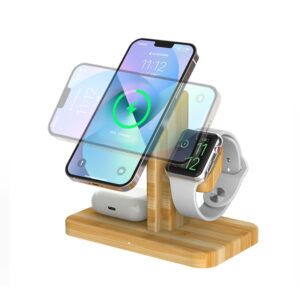
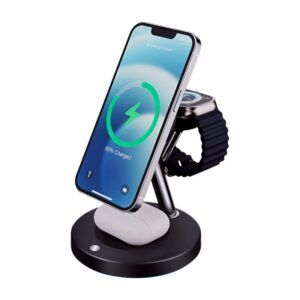
The design response is a transmitting coil sized for the load, or a dedicated earbud position with a smaller coil and a defined placement area. Copying a phone pad and labelling a corner as the earbud spot is the most common cause of slow earbud charging in 3-in-1 stations.
Foreign object detection and metal cases
A metal object on a transmitting pad absorbs energy and heats up, which is why detection is required. Cases with metal elements, and cases containing cards, can trigger that detection and stop charging. On an earbud position where the load is small, the margin between a genuine load and a stray object is narrower.
For buyers, the practical instruction is to charge the case without metal accessories attached and to use the position the product documentation specifies, which is usually marked on the surface.
Specifying an earbud position on a multi-device station
Three specification lines make the difference: coil size and position for the case format being targeted, the detection threshold for light loads, and a placement guide on the surface. Adding a thermal statement completes it, since the case has little surface area to dissipate heat.
WECENT builds multi-device wireless stations within its wireless charger range, with separate positions for phone, watch and earbuds, and treats each position as its own electrical and mechanical design. Sampling, certification planning and batch traceability are handled through the OEM/ODM programme, with functional testing and per-batch records from the quality control gates. Adapter efficiency documentation follows the destination market’s rules (Regulation (EU) 2019/1782 and 10 CFR Part 430), and the inductive function is certified through the Qi programme rather than through those adapter rules (Wireless Power Consortium: Qi).
Documentation matters as much as hardware here. A short card showing where an earbud case should sit, and stating the case-thickness limit for the phone position, removes most of the ambiguity that turns into support contacts. For station programmes supplied to hospitality or office customers, that card is often the difference between a product used as intended and one reported as unreliable.
It is also worth writing the detection threshold into the brief. A station that stops charging for a light load or a metal object is doing what the standard requires; the defect is a threshold that cannot tell the two apart. Specifying it lets a supplier demonstrate the behaviour during sampling instead of leaving it to the field.
Troubleshooting earbud charging on a pad
Three checks cover most cases. Confirm the case supports wireless charging at all. Move it around the marked position in small steps to find the coil. And test the same case on a flat pad to establish whether the issue follows the case or the station.
Where a case charges on a flat pad but not on a station’s earbud spot, the station’s coil size or detection threshold is the variable, and that is a product issue rather than a user error.
FAQ
Do AirPods support MagSafe?
Wireless charging support depends on the model and generation rather than on the pad’s brand. A case that supports Qi wireless charging will charge on a magnetic pad, but the magnets provide no alignment benefit for the case, so placement is manual.
Can you charge AirPods with MagSafe?
Yes, on the pads that support Qi charging. The determination is whether the specific case supports wireless charging, which the product’s own specification states; the pad simply has to be Qi-compatible and detect the light load.
Why is my AirPods case charging so slowly?
An earbud case presents a small load, and a pad whose coil and detection threshold are sized for a phone transfers only part of its field into a small receiving coil. A dedicated earbud position with a smaller coil charges noticeably better than a corner of a phone pad.
Why does my pad stop charging when I place the case on it?
The pad may be interpreting the light load or a metal element in the case as a foreign object and stopping charging as a protection measure. Removing metal accessories and using the marked position usually resolves it; if not, the station’s detection threshold is the issue.
What should a brand specify for an earbud charging position?
Coil size and placement for the target case format, detection behaviour for light loads, a placement guide on the surface, and a thermal statement. Each position on a multi-device station needs its own specification rather than inheriting the phone pad’s design.
Designing a multi-device charging station?
Share the device mix, station format and target markets, and WECENT will confirm the coil specification for each position, the detection behaviour and the MOQ.
Request a station specification
This article is part of iPhone Chargers, the guide that covers this topic in decision order.