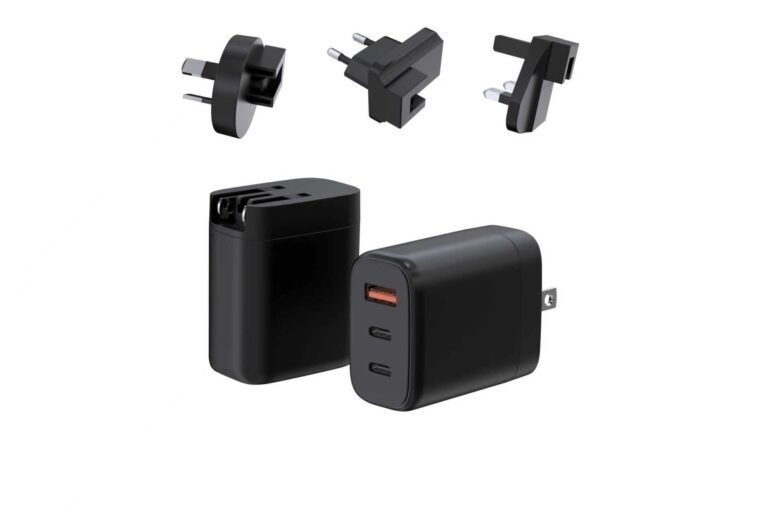
The MacBook charger alternative question is really three questions: what does the machine need, what does the charger support, and what safety evidence does the charger carry. MacBooks charge over USB-C PD, which means a certified GaN charger with the right profile can replace the original brick — but only when the machine’s official request, the charger’s profile list and the cable all agree. This guide covers MacBook power needs by model, the compatibility rules for third-party chargers, the safety checks before replacing an OEM brick, the one-charger-for-a-mixed-fleet option, and a checklist for buyers.
MacBook Power Needs by Model
The power needs vary by model and generation, and the authoritative source is Apple’s official specification for each machine:
- MacBook Air models generally charge in the 30–65W range depending on the generation.
- MacBook Pro 13/14 models typically sit in the 60–100W range.
- MacBook Pro 16 and high-end configurations can request 140W through USB-C.
The reference is the original adapter: match or exceed its wattage, and the machine negotiates what it needs. A charger rated below the request charges slowly or not at all under load; one rated above is safe because the machine draws only its request.
The Air-versus-Pro distinction is where buyers misread the category. An Air with a 30W adapter is fully served by a 30–65W charger; a Pro 16 with a 140W adapter needs the 140W tier. The mistake is assuming the same charger covers the whole MacBook line — the wattage follows the machine, and the machine’s official spec is the reference. A mixed fleet needs the tier map, not one universal number.
The Compatibility Rules for Third-Party Chargers
Third-party MacBook chargers work when three conditions hold:
- PD compatibility. The charger must advertise the profiles the MacBook negotiates, including the 20V step at sufficient current.
- Wattage coverage. The charger’s tier must match or exceed the machine’s request.
- Cable rating. The cable must carry the negotiated current, with an e-marked cable for the higher tiers.
The compatibility claim should be verified with the real machine, not accepted from the box: plug in, check the charging indicator, and run the machine under load. The negotiation is the truth, and the profile list is the specification.
The enterprise dimension adds volume: an IT team sourcing chargers for a Mac fleet needs the tier map, the compatibility list and the batch consistency, because the purchase is a program, not a one-off. The same verification — profiles, cable, certificate, real-machine test — scales to the fleet, and the documentation that comes with each batch keeps the program stable.
Expert view — WECENT project engineering team: The MacBook compatibility questions we answer are usually about the 140W tier: does a 140W third-party charger work, and is it safe. The answers are the same as any PD charger — the profile list must cover the machine’s request, the cable must carry it, and the certificate must name the configuration. The machine negotiates; the buyer verifies.
Safety Checks Before Replacing an OEM MacBook Brick
- Confirm the machine’s official power request.
- Check the charger’s certification for your market, with the certificate naming the model and configuration.
- Verify the profile list covers the machine’s request at sufficient current.
- Use a cable rated for the output.
- Confirm the protections — overcurrent, overvoltage, overtemperature, short-circuit — are documented and tested.
- Test with the real machine under load before relying on it daily.
The safety checks are the same discipline as any charger purchase, with one addition: the machine’s high power draw makes the thermal behavior and the sustained test more important, because a MacBook under load is a sustained load.
The sustained test is the check that separates a charger that works from one that throttles: run the machine under load for an hour, watch the housing temperature and the output, and confirm the plateau. The MacBook’s power draw is the sustained case, and the charger that survives the hour is the charger worth relying on daily.
One Charger for a Mixed Mac Fleet
For an organization with a mixed fleet, one charger can cover multiple machines when the tier matches the highest request:
- A 65W charger covers the Air and most 13-inch models.
- A 100W charger covers the mid-range Pros and adds headroom.
- A 140W charger covers the whole fleet including the 16-inch high-end models.
The fleet decision is the same as any standardization: audit the machines, find the dominant cluster, and manage the exceptions explicitly. The one-charger option reduces the spare pool and the support burden without forcing one wattage onto every machine.
The cable standardization belongs in the same plan: one rated cable per charger tier, e-marked where the tier needs it, keeps the support simple and the delivered power consistent. The cable is the half of the system that the fleet program controls, and it is the half that prevents the “slow charging” tickets.
A Checklist for MacBook Charger Buyers
- Read the machine’s official power request from Apple’s specification.
- Choose the tier that matches or exceeds it.
- Verify the charger’s PD profiles cover the request.
- Use a cable rated for the output, e-marked for the higher tiers.
- Confirm the certification names the model and configuration.
- Test with the real machine under load.
For a MacBook charger decision, the GaN charger catalog lists the tiers and profiles, and the WECENT commercial team can confirm the compatibility and documentation for your machines. The WECENT FAQ center covers the PD and compatibility questions buyers raise.
The MacBook alternative decision, in one path: read the machine’s official request, choose the matching tier, verify the PD profiles, pair the rated cable, confirm the certificate, and test with the real machine under load. The path is the same for a single user and a fleet, and the evidence is what makes the alternative trustworthy.
The retail version of the path is a tier map: a 65W SKU for the Air buyer, a 100W for the mid-range Pro, and a 140W for the 16-inch user, with the compatibility list published on the listing. The map answers the MacBook buyer’s question at the counter — and the certificate and the cable are the details that keep the answer honest.
The MacBook alternative, in the end, is an evidence decision: the machine’s official request, the charger’s profiles, the cable’s rating, the certificate’s configuration and the sustained test. The buyer who runs the five checks replaces the OEM brick with confidence, and the fleet that standardizes the tier map plus the cable keeps the support simple. The evidence is what makes the alternative trustworthy.
The Verification Path
The MacBook alternative verification follows five steps that scale from one machine to a fleet. Read the machine’s official power request; choose the tier that matches or exceeds it; confirm the charger’s PD profiles cover the request; pair the rated cable, e-marked where the tier needs it; and test with the real machine under load while checking the certificate names the configuration. Each step is quick, and together they cover the compatibility, the delivery and the documentation that the alternative must prove.
For an IT team, the path becomes the fleet standard: the tier map, the compatibility list and the batch records are the program’s documentation, and the same verification runs at each reorder. The evidence is what makes the third-party alternative trustworthy — and the trust is what keeps the fleet consistent.
The alternative, in the end, is as good as its evidence — and the evidence is the same for one machine or a hundred.
The last note for the fleet: the tier map, the compatibility list and the batch records are the program’s memory — keep them current, and the alternative stays dependable through every refresh.
Frequently Asked Questions
Can a third-party charger replace the MacBook brick?
Yes, when the charger’s PD profiles cover the machine’s request, the cable is rated for the output, and the certificate names the configuration. Verify with the real machine.
What wattage does a MacBook Air need?
Most MacBook Air generations charge in the 30–65W range; check the official specification for the exact model and match or exceed it.
Is a 140W third-party charger safe for a MacBook Pro 16?
When the charger is certified, the profile list covers the request, and the cable is e-marked — yes. The machine negotiates its own ceiling and draws only what it needs.
Do I need an Apple charger for my MacBook?
No. A certified USB-C PD charger with the correct profile works; the safety and compatibility evidence matter more than the brand on the brick.
Can one charger serve a mixed Mac fleet?
Yes, when the tier matches the highest request in the fleet. Audit the machines, choose the tier, and manage the exceptions explicitly.
Can WECENT supply MacBook-compatible chargers?
WECENT is an OEM/ODM partner with USB-C PD chargers across the tiers. Share your target MacBook models with the project team to confirm profiles and compatibility.
Sources
- WECENT – GaN Charger Category
- WECENT – FAQ
- WECENT – Quality Control
- WECENT – Contact Us
- USB Implementers Forum – Official Website
- International Electrotechnical Commission – Official Website
This article is part of Laptop Chargers, the guide that covers this topic in decision order.